3. Modes
Settings ▸ Mode ▸ Mode picks one of four screens: Classic, Advanced, Stage, Roadbook (default: Advanced).
The mode changes what you see and what the buttons do. It does not change how distance is measured, which is the same engine everywhere.
3.1 Which one, and why two of them score in opposite directions
The most important functional distinction in the app, because Stage and Roadbook look similar and are scored in opposite ways.
- Stage is for repeating the same course, where the best run counts. A hillclimb, a sprint, a practice day, a test session. This is where the live gap to your best, the fastest flag and discarding a junk run all live.
- Roadbook is for a whole event driven once through, with everything in one book. Every pass is summed, and there is no best-of. So there is deliberately no ghost and no discard, because offering them would lie about how you are being scored.
| Your situation | Mode |
|---|---|
| Touring, no times, want the biggest numbers | Classic |
| A rally where you read the paper yourself and need accurate distances and average speeds | Advanced |
| Regularity or TSD with the route transcribed into the app | Roadbook, Regularity |
| Repeating one course, best run counts | Stage |
| A timed run inside a whole event | Roadbook, Special Stage |
| Open-road racing to a target average with speed zones | Roadbook, Open Road |
| A liaison between competitive parts | Roadbook with a Transit part, or Advanced |
⚠️ Liaisons do not score. Transit time never enters a rally result. Only penalties do, which is why the app reports competitive times separately and never folds road sections into them.
3.2 Classic
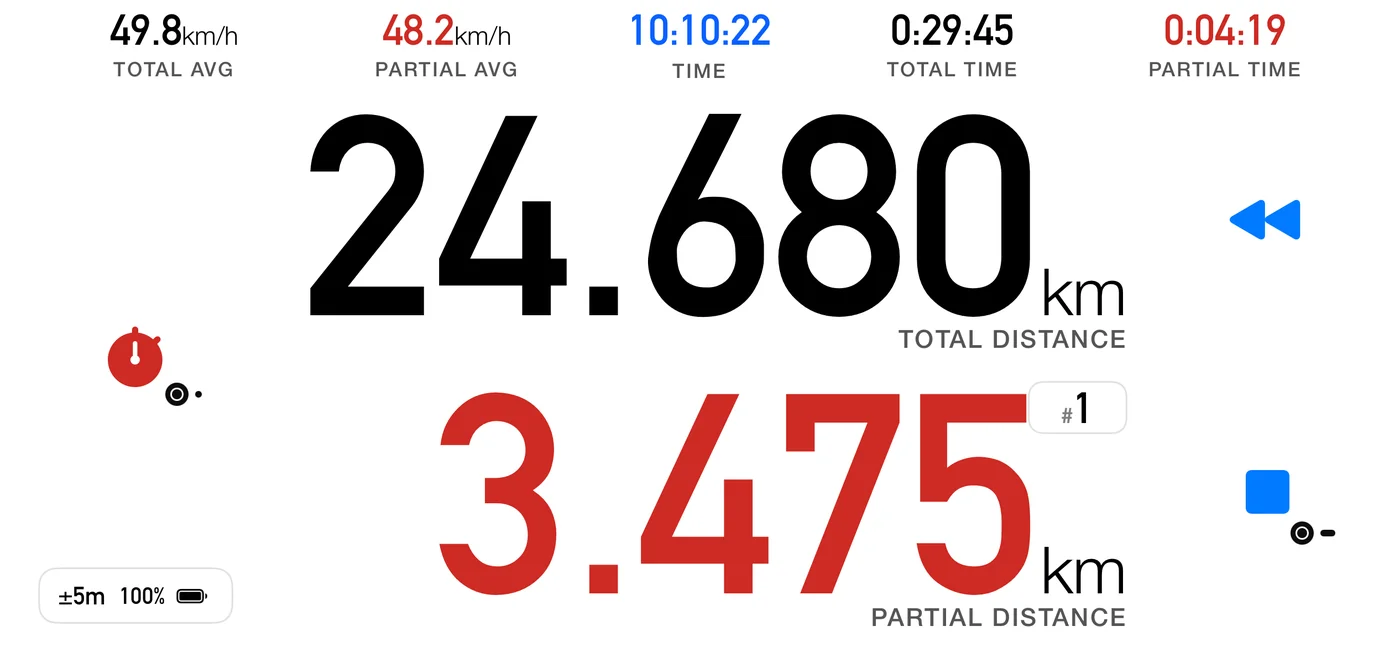
Two large counters, total and partial, with smaller supporting values.
Tap a top readout to promote it. The big pair cycles between distance, time and speed, so you can have a huge partial time rather than a huge partial distance. The choice lasts for as long as the app is running: close it or restart your device and Classic comes back with distance in the big slot.
Settings ▸ Dashboard ▸ Speed to display chooses whether the speed readout shows your Total avg. (default) or your Current speed.
Use Classic when you want the biggest possible numbers and are not working to a schedule. Pinch in to reach Advanced.
3.3 Advanced
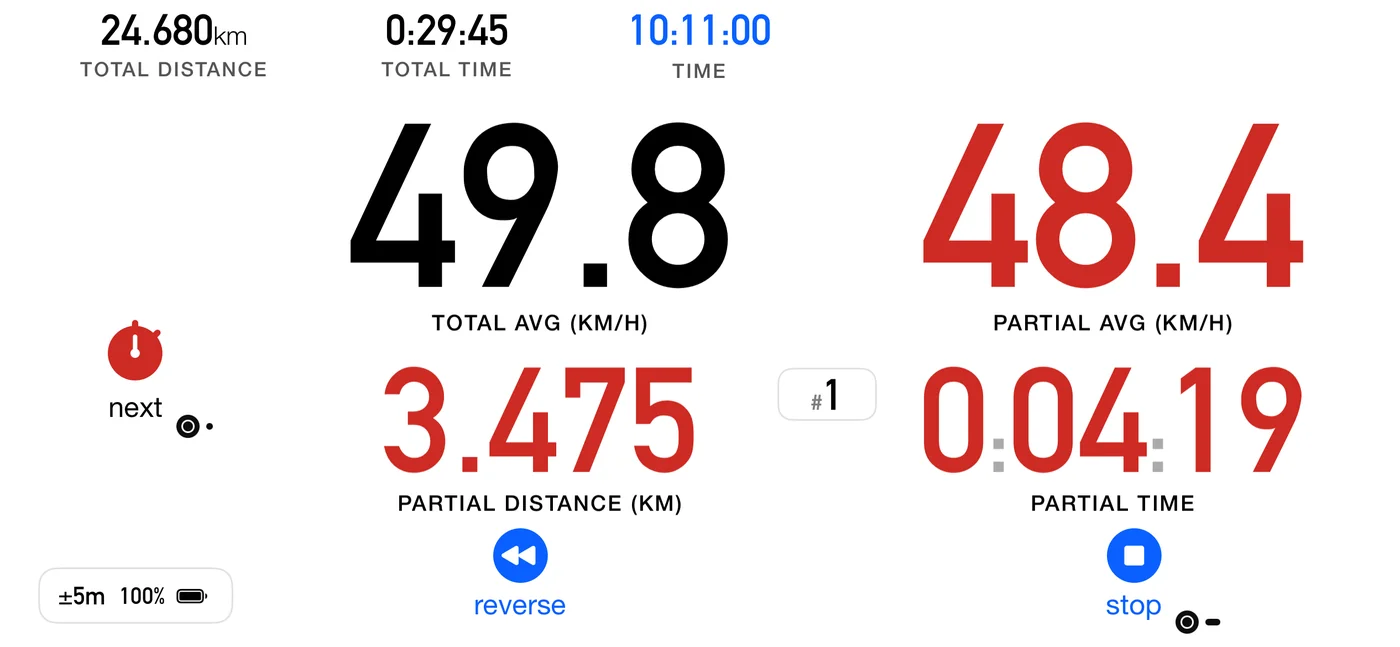
The default. A dense four-up grid, plus a compact button row that appears and disappears with the run state.
Advanced is what most crews use when they are not following a roadbook: everything on one screen, with no tapping to swap values. Pinch out to go back to Classic.
3.4 Stage
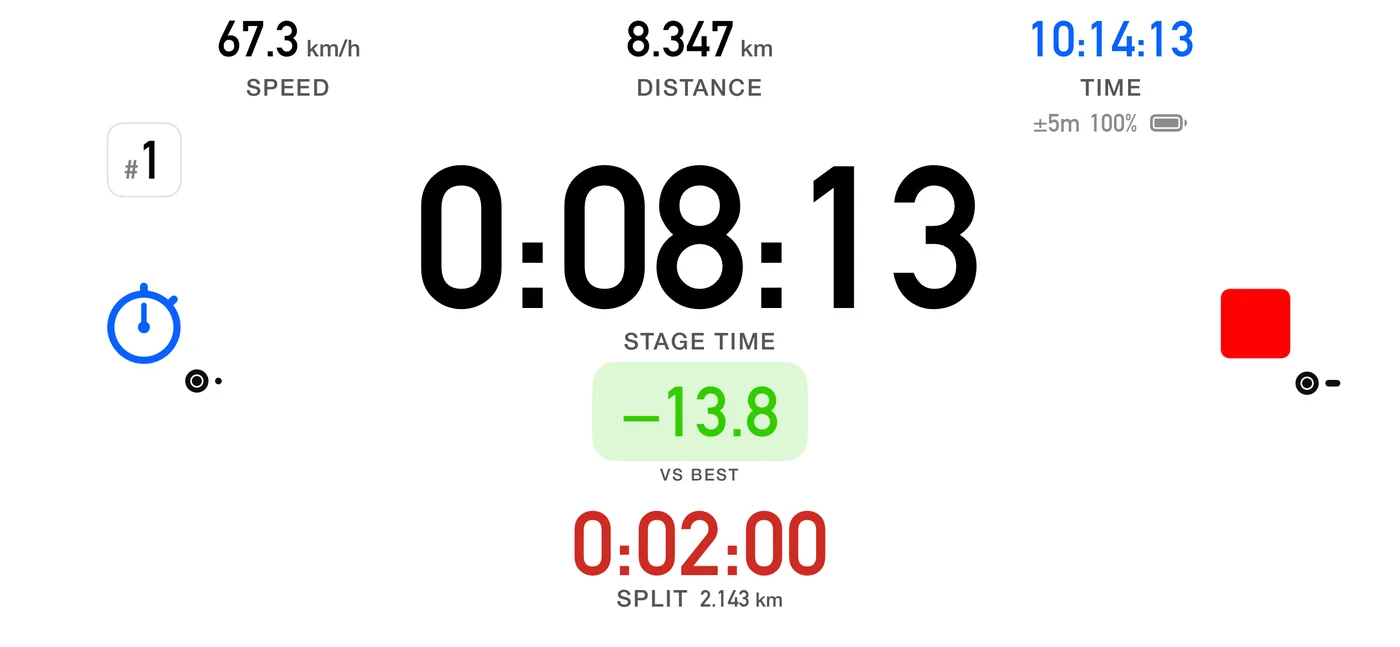
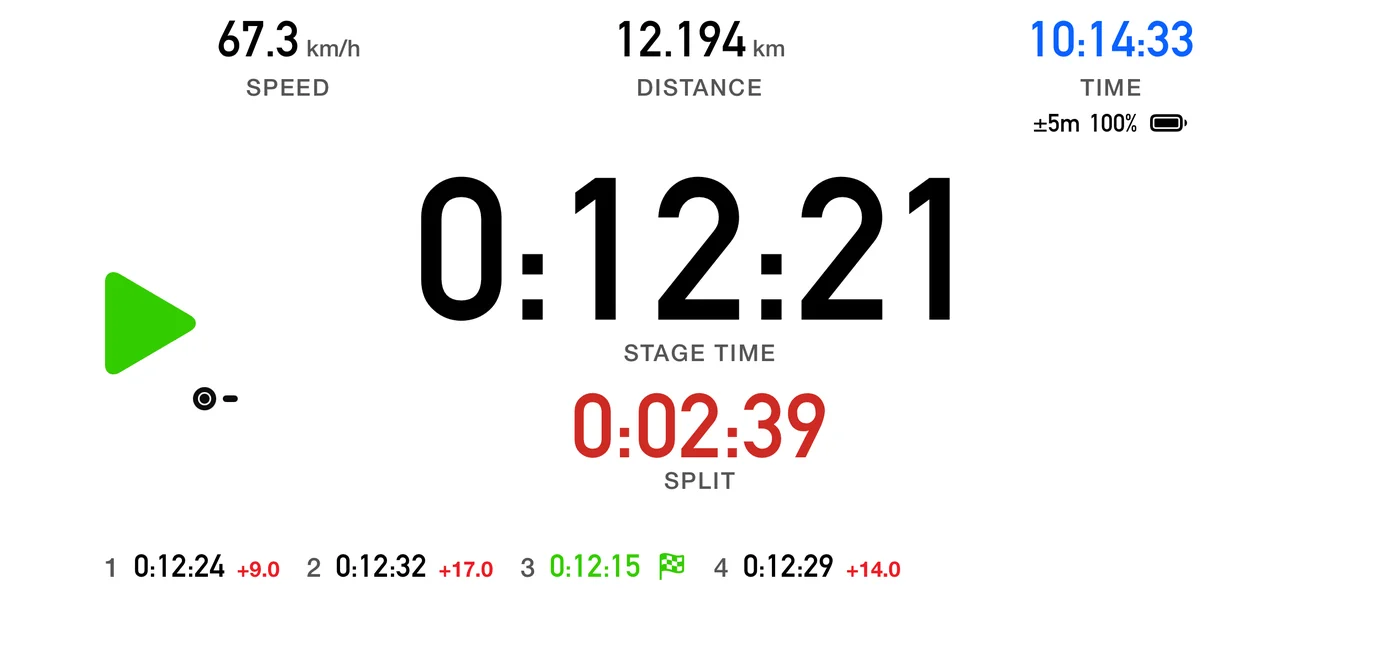
A purpose-built instrument for a flat-out timed run, and for comparing your runs of the same course against each other.
What is on screen
- A very large hero clock, the time since go. Tap the timer to swap it with the current split. The split is always red and the total always the normal ink colour, wherever each sits.
- A split badge showing which split you are timing.
- A strip: current speed, distance, clock, plus the GPS accuracy and the battery. Tap the clock to set the official-time offset.
- The live gap to your best, a tinted pill under the hero: how far ahead or behind your best run of the day you are at the same point on the course. Green ahead, red behind. On the first run of a session there is nothing to compare against, so it stays away.
- The splits, each with the distance it covered. Tap the list to flip between interval and cumulative times.
next marks a split rather than starting a scheduled part. It banks the time and distance, and speaks the elapsed time if Voice is on.
Stopping is a single tap, always, whatever your confirm and double-tap settings say. A hold or a dialog would land on the recorded elapsed time, and that elapsed time is the result.
Sessions, the best run, and discarding
The app never asks you to manage a session. It infers one: two runs belong together when they start at about the same place, within 500 m, on the same calendar day, and cover about the same distance, within 15% of the longer of the two. Start location is the strong signal, since a different course is miles away; the same-day rule matches the sport's own idea of a fastest time of the day; and the distance test separates two different courses that happen to share a start, such as a short run and a long one from the same paddock.
Once a session has two or more runs, comparison is simply on. Parked, the runs strip lists them with the fastest flagged, and the recap shows the delta against your best run of the session, captioned vs best, plus a FASTEST flag when you have just beaten it.
One benchmark, everywhere. The ghost you drive against, the runs strip and the recap all score you against the session best. They used to disagree: the recap alone graded you against your previous run, so the same run could read "+1.0 s" on the card above a strip showing "+2.0". Both were right, which was the problem.
A junk run, a warm-up or an aborted attempt, is discarded from the recap. It then drops out of the session best and stops being the next run's baseline, exactly like deleting a bad lap. That is deliberately a per-run decision: a single yes-or-no for the whole session could not express "this one run was a test".
⚠️ This is your own clock, not the organiser's. The gap, the fastest flag and the splits are your measure of your driving. See the note at the top of chapter 6.
3.5 Roadbook
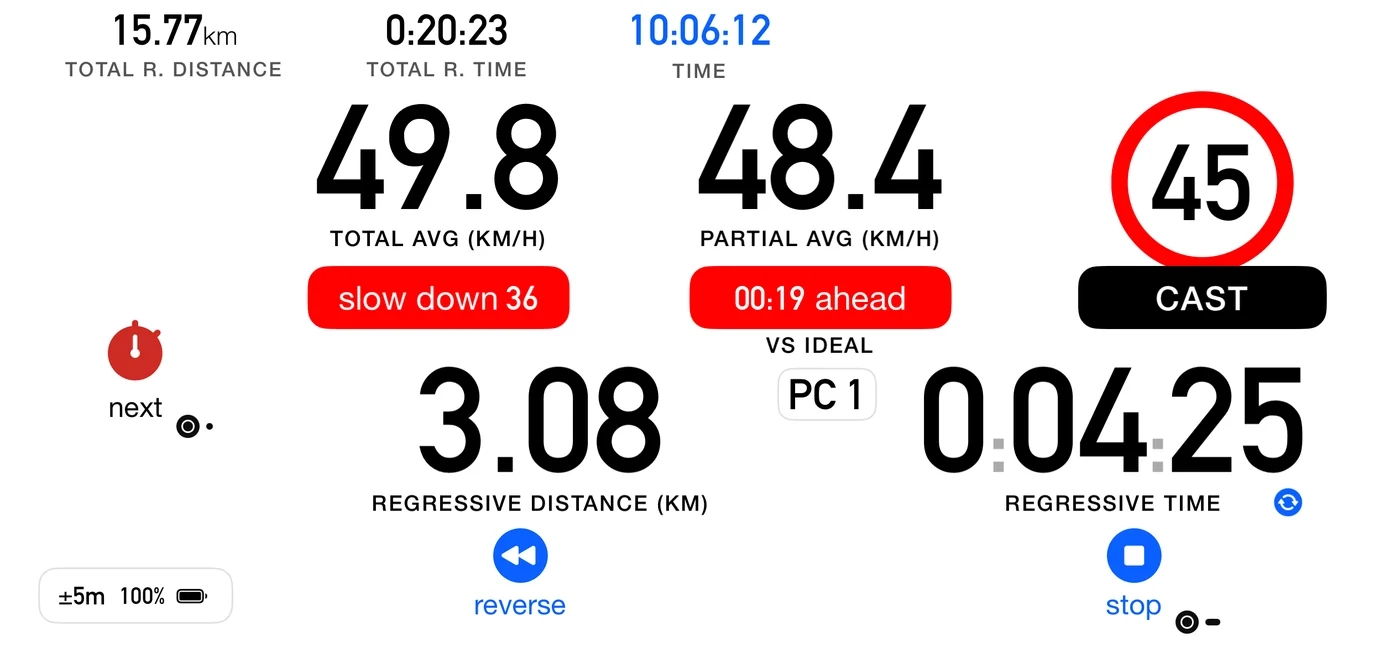
Follows the selected part of the selected roadbook: the app knows every row's distance and target, shows what you are on, tells you whether you are fast or slow, and counts down to the next boundary.
It requires a roadbook. Selecting the mode with nothing to follow does not switch. It offers to build one instead:
No roadbook yet: Roadbook mode needs a route to follow. Create one now, or keep using Classic or Advanced.
Create Roadbook takes you straight into the editor, Not now leaves you where you were, and the Mode selector goes back to what it was either way.
Build one in chapter 5, drive it with chapter 6.
Two more constraints:
- ⚠️ Legacy customers cannot select Roadbook mode, and are offered the one-off Lifetime Full Access Pass instead. The editor still opens, so you can build and explore. See chapter 12.
- While a run is under way you cannot switch which roadbook you are driving, though you can still edit the one you are on. See 5.13.
Pinch does nothing here. You leave Roadbook from Settings.
3.6 Repeating the same road inside one roadbook
A road driven twice in an event is normal, and it is simply entered twice, at its own place in the itinerary, with the transit between. Both passes count and both are summed.
⚠️ Known limitation. The app holds no link between the two passes, so it cannot compare your two runs of the same road inside a roadbook. That comparison exists only in Stage.
3.7 Switching modes
You can switch mid-run. The dashboard re-renders and the counters keep going, with nothing reset. Switching into Roadbook mid-run picks up at the crossing count you are already on.
Changing mode rebuilds Settings, because the mode-scoped section appears and disappears with it.