5. Roadbooks: building them
A roadbook in 3pRally is the route the app follows for you. You transcribe the paper once, and from then on the app knows what is coming, what you are supposed to be doing, and how far you are off it.
Open it from Settings ▸ Mode ▸ Roadbooks. The row's right side names what is currently selected, so you can see what you are about to drive without opening anything.
A note on words. The app swaps the name for one timed piece of road depending on what your event calls it: section, leg or stage (Settings ▸ Mode ▸ Segment name). This chapter calls the thing you type a row, because that is what it is in the editor, and leaves the driven thing to whatever word your app is showing you.
5.1 The structure
Roadbook            "Mille Miglia 2026"        the shareable, syncable unit
└── one or more     "Day 1"                    the runnable unit, carries the DISCIPLINE
    └── rows        CAST 50 km/h, 12.40 km     what you drive
The middle level is what you select and run. A one day event is the simple case: one roadbook, one of them, and a list of rows.
⚠️ Only the selected one is driven. A roadbook holding a whole week is not chained together automatically. You select the next one between runs.
5.2 Disciplines
Tap the discipline chip in the editor header. The choice belongs to the middle level, and it decides which row types you may use:
| Discipline | Competitive row | Also available | What it models |
|---|---|---|---|
| Regularity | CAST, Target Avg | Time, Transit, Pause | TSD and regularity: hold a prescribed average |
| Special Stage | Special | Time, Transit, Pause | Flat out, fastest elapsed time wins |
| Open Road | Open Road, Target Avg | Time, Transit, Pause | Open-road racing, in either of its two scoring shapes |
| Transit | Transit | Pause | A non-competitive liaison |
Changing the discipline when rows exist that the new one does not use offers to convert them: they are re-typed to the new discipline's primary type and keep their distances.
5.3 Row types
| Type | Requires | Optional | Where its time comes from |
|---|---|---|---|
| CAST | distance, ideal speed | distance divided by the speed | |
| Target Avg | distance, target average | MAX ceiling | distance divided by the average |
| Time | distance, a time | the time you entered | |
| Transit | distance, a time | the time you entered | |
| Pause | a time. No distance | the time you entered | |
| Special | distance | unknown until you drive it | |
| Open Road | distance | base speed, max cap | distance divided by the base speed, or by the max when there is no base |
An Open Road row with neither a base speed nor a max is unbounded: it has no time of its own, so the schedule simply carries across it, and the dashboard shows no speed sign and no time-vs-base readout on it.
Time, Transit and Pause are three different things, and the difference is movement. A Time is a paced section given as a duration instead of a speed: "cover 3.5 km in 4:12" rather than "hold 50". A Transit is a liaison between competitive sectors, where you are due at the far end at a time and are not held to an average. The delta readout says so: it reads vs ideal on a Time and vs schedule on a Transit.
A Pause is neither, because you are not driving. It is a halt at a place: a regroup, a service point, lunch, parc fermé. It has a duration and no length, so the distance field is not shown for it, and the strip prints a dash where the length would be. That is how an event writes one: a road book gives the transit that reaches the stop, and the stop itself occupies time on the schedule, not road.
What a pause does while you are sitting in one is in 6.6b.
Roadbooks written before 5.0 have pauses with a distance, because the old editor required one. Those that describe a stretch of road are converted to Transits when the roadbook is brought across, which changes nothing about the schedule: a Transit is scheduled from the same distance and time. A pause that was already written at a single point stays a pause.
CAST and Target Avg both minimise error against an average, and they sit side by side in the Regularity palette. The difference is the ceiling: Target Avg carries an optional MAX, which is a limit you are flagged for crossing rather than a scored penalty.
Do not model a precision trial as a Special. The short precision rows some regularity events print, forty to sixty metres at a walking-pace target, are precision trials inside a regularity event. Author them as CAST or Target Avg. A true special stage cannot legally appear inside a regularity event at all.
5.4 Controls and references
This is the idea the rest of the chapter hangs on.
A roadbook has two kinds of rows. A control is a place the organiser measures you: a time control, a test, a start or a finish. A reference is a waypoint you tick off along the way ("at the church, keep left, still 50"), printed so you can follow the route.
The consequence while driving: your trip counter still zeroes at a reference, so the distance to the next instruction is always in front of you, but your average keeps running across it, because you are still being timed on the same average until the next real control. A reference tidies your navigation without disturbing the number you are judged on.
You do not mark a row as a reference. There is no such switch. You switch "is a control" off and leave the pace alone, and the row becomes a reference. The app works it out for you: a row is a real boundary when it is a control, or the first row, or the type changes, or the target speed changes. Anything else is a reference, and the editor dims it to show you.
Switching "is a control" off does not stop the app timing that stretch. It always banks a result at every row, because "+3 s at the speed change" is a real and useful fact. What it stops is the app claiming a control: an unscored boundary drops no pin on your map, is absent from the track recap and the export, does not count in the finish card's total, and never raises the "control not marked" warning. Your totals then still agree with the marshal's sheet.
5.5 How a boundary is crossed: tap or auto
The sport's own rule sets this up. SCCA RoadRally §E4: "All average speed changes must occur at a specific sign, landmark or at an official mileage." Those are exactly the two cases:
| The roadbook says | Who crosses it | Row mode |
|---|---|---|
| an official mileage | the odometer | auto |
| a sign or a landmark | your eyes | tap |
Set it per row. There is a roadbook-wide Advance default, off out of the box, and rows inherit it until you override them. Real route books mix both inside one run, so the row is the truth and the roadbook-wide setting is only the fallback.
Three things worth knowing:
- An auto boundary is still tappable. Odometer drift, a mis-transcribed row, a tunnel. The tap overrides, and rule E4 is why it has to.
- New in 5.0: tapping just after it fired does not cross a second control. The boundary crosses itself and announces it, but by then your thumb is already moving, and that tap used to bank a part of almost no length and step you past a control you never reached. The app now absorbs that tap and tells you the control was already crossed, so you do not have to know in advance not to press. It only absorbs a tap that cannot be a real crossing: on a short part, or one with no distance, your tap goes through as it always did. See 6.6a.
- Crossing early costs almost nothing. Auto fires against the cumulative authored distance, so one short part is followed by one long one and the book is back in step at the next boundary. Cross more than 300 m or 10% early, whichever is larger (but never more than half the part's own length, so a short part is still checked), and the app flags it as cut short and offers about nine seconds to undo it. A mis-tap that is not detectably early has no way back, so tap deliberately.
- Advance never ends the run. The finish is a press unless the roadbook's Finish is set to auto. See 6.8.
5.6 Row flags
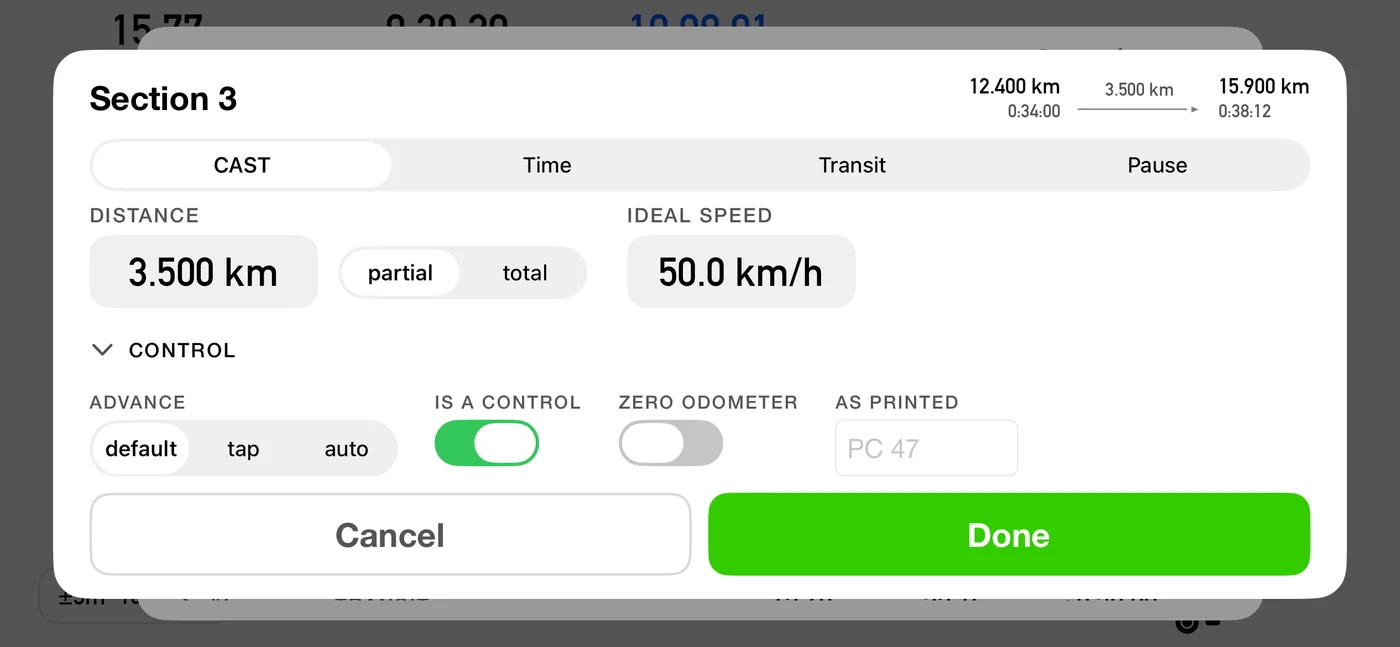
Beyond the type and the numbers, each row carries four switches. All four exist because they are printed on the paper, not because they are settings.
Is a control. Covered in 5.4. Off means the app still times the stretch and still shows you your error, it simply does not count it as a control.
Advance. Tap or auto, per 5.5.
Zero the odometer here. Some roadbooks tell you to reset your trip meter at a control. Switch this on for the row that control opens, and 3pRally does it for you the moment you mark the control. The total distance goes back to zero, so it keeps matching the paper. It is not a restart. Your time, your schedule, your marked controls and your position in the roadbook all carry straight on. Only the distance reading goes to zero, and the app keeps its own private count of how far you have really driven, so the finish still knows where it is.
As printed. A roadbook keeps several numbering systems at once, and they do not line up with the app's own count. Type what the paper calls the row ("PC 47") and the dashboard chip shows that instead of "#3", so what you read on screen is what you read on your knee.
5.7 Entering a row
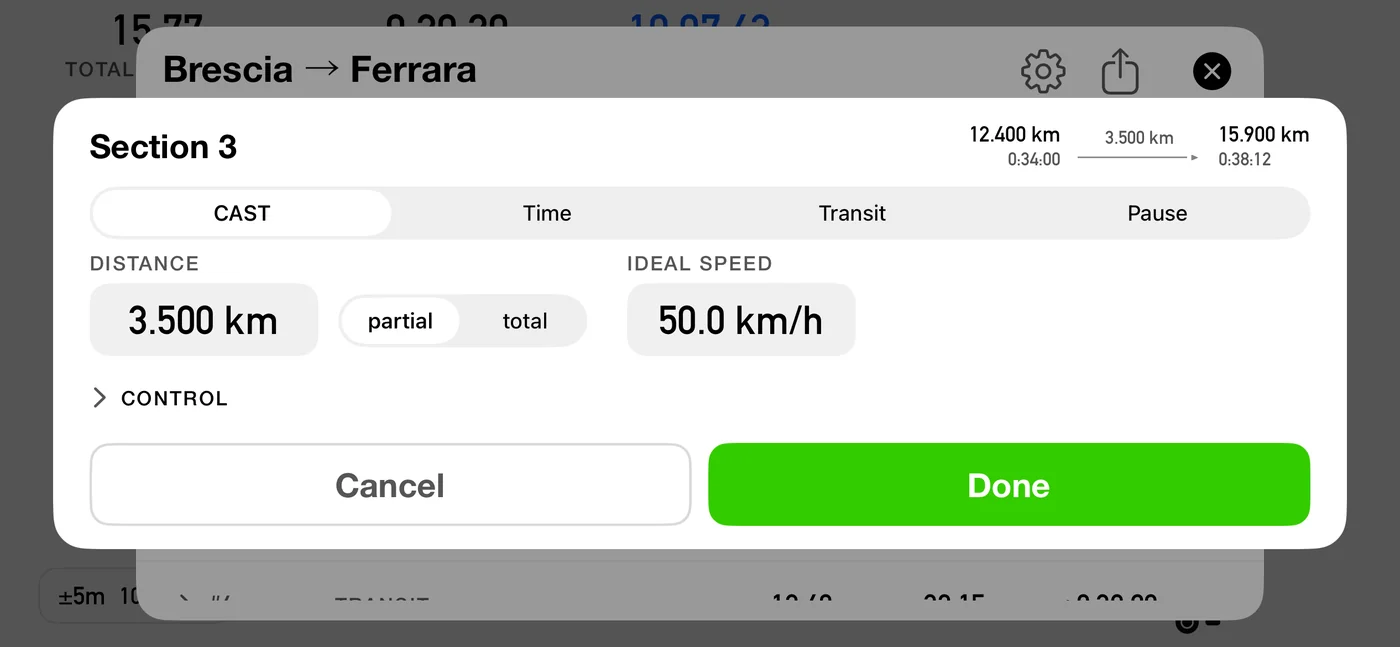
Tap + add a row at the bottom of the strip, or tap an existing row to edit it. The card gives you:
- a type picker, limited to the discipline's palette. A new row starts on the discipline's main type (CAST for Regularity, Open Road for Open Road, Special for a special stage, Transit for a transit), so the fields below already match it before you type anything;
- a distance, typed as either partial (this row's own length) or total (the cumulative distance at its end). A Pause has no distance field, because it has no length;
- the rate: a speed for CAST and Target Avg, a base speed and a max for Open Road, a time for Time, Transit and Pause, nothing for Special;
- the four flags above;
- an entry line,
starts <distance> · <time>, so a total has a visible starting point; - an exit preview,
ends … · … · partial …, computed live as you type.
Save + next saves and drops you into a blank row, carrying the type and your partial-or-total choice forward. The speed is left blank on purpose: typing it for each row is the moment you notice a row that is not really the same pace as the one before.
Long-press a row for insert above, insert below, duplicate and delete. Edit turns on drag to reorder, which re-derives every total.
5.8 What the app refuses, and what it warns about
Checked when you save a row:
| Rule | Message |
|---|---|
| A type must be chosen | please choose a … type |
| A distance is required | please enter a distance |
| Distance at most 9 000 km | the distance you entered is too big |
| CAST needs a speed | please enter the ideal speed |
| Target Avg needs an average | please enter the average speed |
| Time, Transit and Pause need a time | please enter a time |
| Every type except Pause needs a distance | please enter a distance |
| Open Road: max at or above the base speed | the max speed cannot be below the base speed |
| Target Avg: MAX at or above the average | the max speed cannot be below the target average |
Across the whole list, cumulative distance and cumulative time must keep increasing. If they do not you get the data in this section is conflicting with Distance / Time at section N, which almost always means a total you typed is smaller than the total already reached there. Rows whose time is unknown until driven, Special and an unbounded Open Road, are exempt from the time check by design.
The very short row warning. Under about 300 m the app stops you and explains why:
A stretch this short is below what GPS can place reliably, and the times for the sections around it are built from this row, so a chain of tiny rows drifts away from the organiser's schedule. Rows are for the stretches you drive between controls, not the short tests you are timed through separately. You can save it anyway.
You can Save anyway. The warning is a guard, not a veto.
5.9 Reading the strip as a table
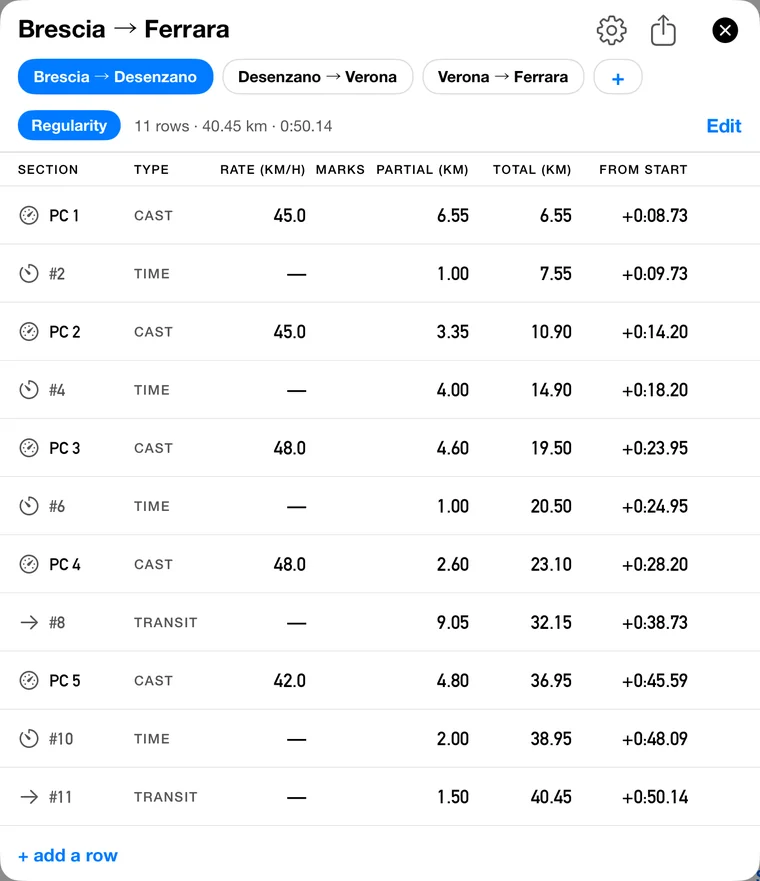
The strip is laid out like the printed roadbook: a grid you check column by column against the paper in your hand, not a list of sentences.
| Column | What it holds |
|---|---|
| Section | the type icon, plus the paper's own label if you typed one, otherwise the app's number |
| Type | the row type |
| Rate | the speed this row is driven to |
| Marks | the row's flags |
| Partial | this row's own length |
| Total | the cumulative distance |
| From start | how far into the run this point falls |
The units are stated once, in the header, so the rows stay clean. Two columns stay quiet where nothing changes: a run of the same kind of row prints its type once and then leaves it blank, and the Rate is left blank while both the type and the speed are unchanged. So a blank in the Rate column always means the pace carries straight on, which is the reading that matters at speed.
A printed speed therefore means something about the pacing changed at that row, and it can be the kind of row rather than the number: a CAST at 45 followed by a Target Avg at 45 reprints the 45, because being paced against a target average is not a continuation of a CAST, and a blank there would claim it was. The type icon still shows on every row, so you never lose track of what you are on.
You can read that off the figure. PC 1 is a CAST at 45.0, #2 is a TIME, and PC 2 comes back to CAST and prints 45.0 again: the same number as two rows earlier, reprinted because a TIME row fell between them, so the pacing restarted rather than carried on. The same thing happens at 48.0 either side of #6. Nothing in this stage runs two rows of one kind back to back, so no Rate cell is blank here: the blank is what you see down a chain of CASTs held at one speed.
The last column is written with a plus sign, "+0:15:53", so it can never be mistaken for a time of day. It is how long into the run this point falls, not the hour a clock would show.
From start is hidden while you are editing. Tapping Edit adds the delete and reorder controls on either side of every row, which leaves less width for the grid, so the widest column steps aside and returns when you tap Done. It is the one you are least likely to be reading while dragging rows around.
The legend under the strip names the marks, and lists only the ones this stage actually uses: dimmed = reference, not a control, blue = base speed, red = max cap, zero odometer, auto-advance.
5.10 Roadbook format
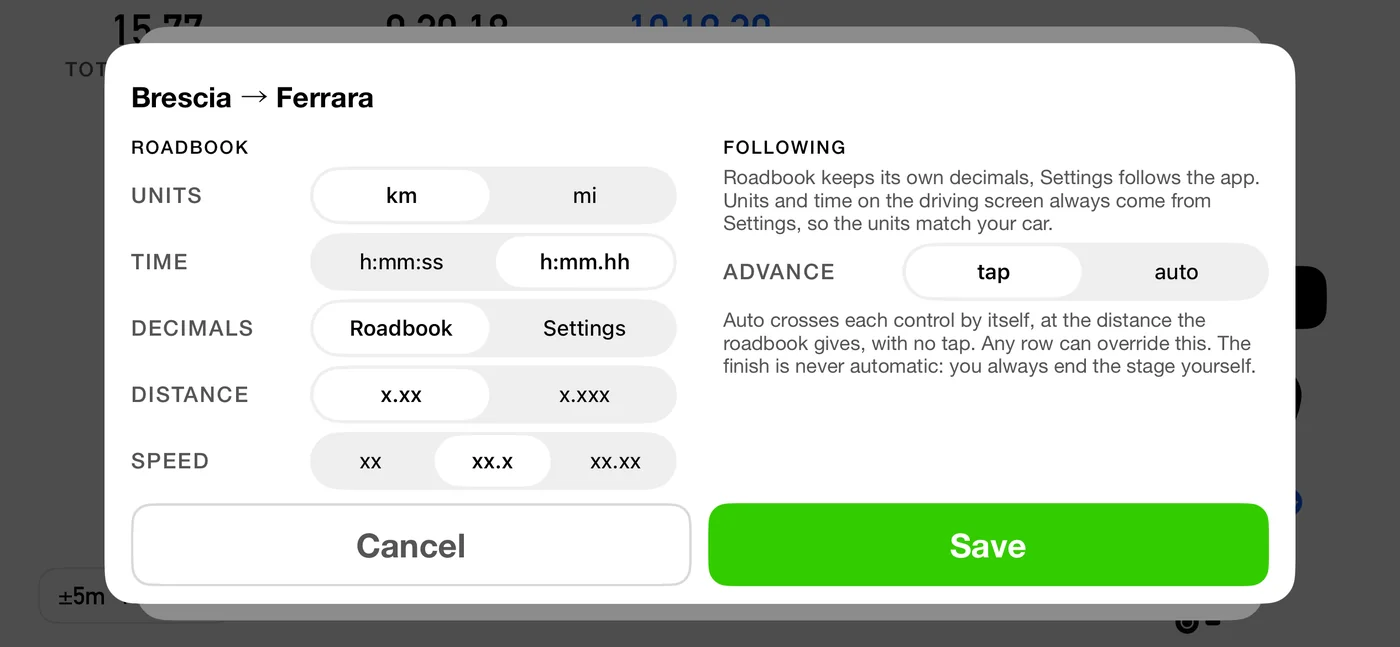
Each roadbook carries the units, precision and time notation it is printed in. Set it when you create the roadbook. To change it later, tap the gear icon in the roadbook editor's header, or swipe the roadbook in the library and tap Edit.
| Field | Options |
|---|---|
| Units | km or miles |
| Time | the same four as Settings: h:mm:ss, h:mm:ss.d (tenths of a second), h:mm.hh or h:mm.ttt (hundredths or thousandths of a minute); the time entry then takes exactly that precision (until 3pRally 5.1 it offered only seconds or hundredths of a minute) |
| Decimals | Roadbook, or follow Settings: governs the time notation and the two decimal rows under it (the time notation joined them in 3pRally 5.1) |
| Distance decimals | how many decimals distances show |
| Speed decimals | how many decimals speeds show |
| Advance | the roadbook-wide tap or auto default |
| Finish | tap, or auto to end the run at the last part's distance (6.8); not shown when creating a roadbook |
| Tech speed | Open Road only, see below |
You type exactly what is on the paper. Underneath, everything is stored canonically, so changing the format later only changes how numbers are shown and entered, never what is stored.
A new roadbook starts on Decimals: Settings, so if you never open this panel it keeps following your usual precision, including when you change it later. The moment you set the distance or speed decimals by hand, the roadbook switches to Roadbook and holds those figures: you have just told it what the paper says, and paper does not change because a setting did. The toggle says which it is, and puts it back either way.
Switching is always safe. Everything is stored canonically, so neither choice moves a single number in the roadbook, only how the figures are shown.
Once set, the two halves of this panel reach different distances, and it is worth knowing which is which: units follow your car, decimals follow your roadbook.
Precision is the roadbook's. The distance and speed decimals you set here are used everywhere the roadbook is loaded: the strip, the segment editor, the upcoming-part card, the driving screen itself and the run summary afterwards. That is the point of them. A book written to two decimals is driven against a dashboard showing two decimals, so the figure you are calling can be matched against the figure on the page.
A decimal appears only where it carries something. Set the book to one decimal and a target of 80 still reads 80, not 80.0, while a French regularity's 45,3 keeps its 3. This matters more than it looks: target speeds used to be rounded to whole numbers on the driving screen on the assumption that nobody writes a fractional one, which is true of SCCA and HRCR and false of French regularity, where showing 45,3 as 45 is about eight seconds over a twenty-minute test. Nothing was ever computed from the rounded figure, but you drive against what you read.
Units are yours, not the roadbook's. The driving screen always shows the units from Settings ▸ Units & Format, even while you are following a roadbook written in the other ones. This is deliberate. The instrument you are really checking against is the car's odometer, and a crew with a kilometre odometer following a roadbook printed in miles normally wants kilometres in front of them. If you would rather the screen matched the paper, change the units in Settings; nothing about the roadbook has to change, because the distances are stored canonically either way.
The time notation follows the roadbook, like its decimals (3pRally 5.1). While you follow it, the elapsed, regressive and ideal-gap times on the driving screen, the cards and the run summary are written in the roadbook's notation (a book in h:mm:ss.d shows 0:09:16.1 even if Settings says h:mm:ss), unless its Decimals switch says Settings. The time of day is a clock, not a time from the paper, so it stays in your Settings notation. (Until 5.1 every time on the driving screen used Settings.)
The roadbook screens (the strip, the segment editor, the library rows) show the book in its own units and notation, because they are showing you the paper as you transcribed it.
So of the three notation rows on the format sheet, the units are the only one that never crosses to the driving screen. The decimals and the time notation do, which is why those two are the ones the Decimals switch can point at Settings.
Trips driven outside a roadbook (Classic, Advanced, Stage) follow your settings for both.
One thing keeps your settings either way: spoken announcements. The voice reads distances and speeds at the precision from Settings, not the roadbook's, because a spoken number is not something you compare with the page and every extra decimal is another word to sit through at speed.
Tech speed is a class-wide never-exceed ceiling for the whole event, and it appears only when the roadbook has an Open Road part. Once set, it also caps every Target Avg row in the same roadbook, including one in a Regularity stage. The effective ceiling at any moment is the lower of the row's own cap and the tech speed.
5.11 The library
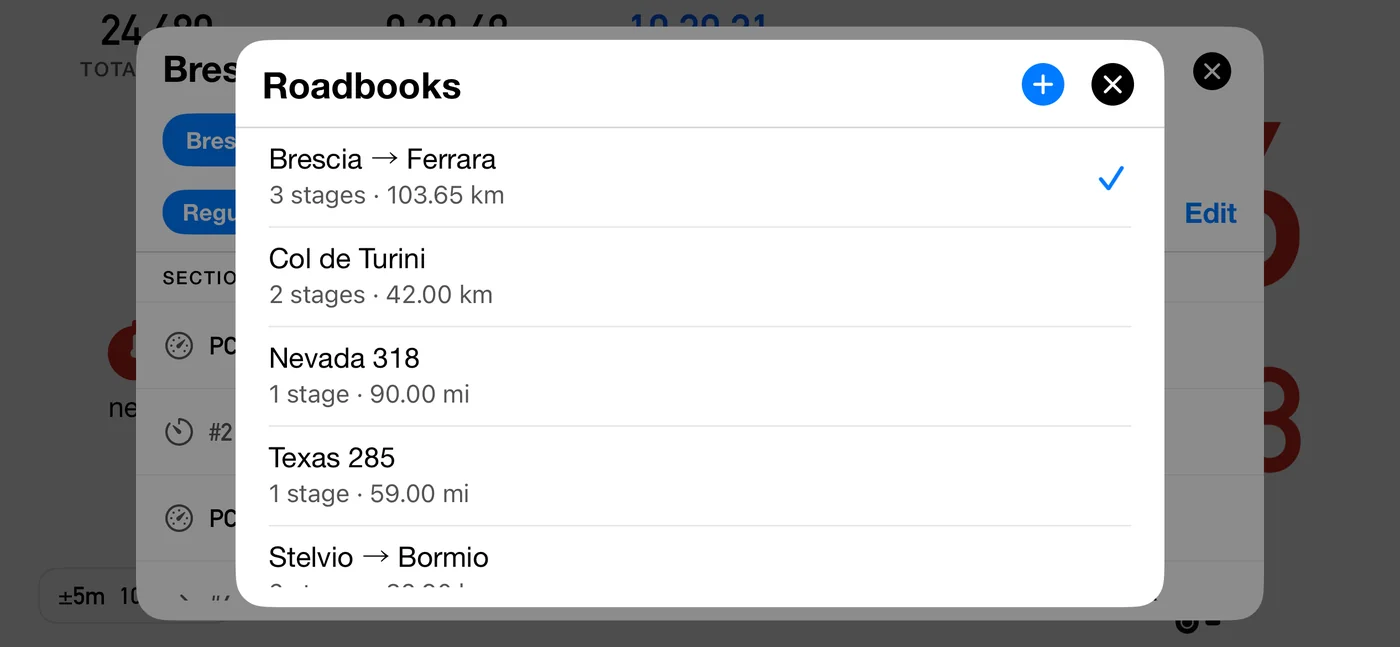
Tap the roadbook name to open it. Rows show the name and a summary in that roadbook's own units, with a checkmark on the active one. Tap to switch, swipe to Edit (name, format, tech speed) or Delete, and tap + in the header to create.
The one you are following is always at the top, and the rest follow in the order you last touched them, so yesterday's roadbook is the second row rather than something to scroll for. The order settles when you open the library and holds while it is open, so nothing moves under your thumb.
Creating one gives it one empty runnable part and drops you into its first row.
With iCloud sync on (Settings ▸ Tracks & roadbooks ▸ Sync to iCloud, off by default; see 5.14), a deleted roadbook waits in Recently Deleted with the days remaining, and restoring it brings it back on your other devices too.
5.12 Sharing and importing
Share exports the whole roadbook, everything in it, as a .3prbk file through the iOS
share sheet. Opening one of those files with 3pRally appends it to your library with a
fresh identity, so importing twice never overwrites anything.
An import never changes which roadbook you are driving. It arrives in the library and waits; you switch to it when you are ready. The only exception is a library that was empty, where the arriving book becomes the active one because there is nothing to displace. So importing three books at a control is safe: nothing moves under you, and nothing you have already loaded is disturbed.
An imported roadbook keeps the date it was last changed on the device it came from, so an old one does not arrive at the top of the library. If you import several, look further down the list.
This is how a co-driver prepares at home and hands the route to the driver's phone at scrutineering.
5.13 What is locked while you are running
The distinction is the whole explanation:
- Editing the roadbook you are driving stays available, and it recalculates live. You fix a row the moment you find it is wrong, which is what actually happens on an event.
- Changing which roadbook you are driving is not available until you stop. There is no coherent answer for what should happen to the distance and time you have already covered.
So while a run is under way the roadbook name stops opening the library and its chevron disappears, the selector chips and the add button go inert, and the long-press menu does not open. Each of those taps explains itself with a brief notice rather than doing nothing. When you stop, everything is available again.
Only roadbook following locks this. In Classic, Advanced and Stage the roadbook is not being followed, so switching it mid-run costs nothing and stays allowed.
5.14 iCloud
Roadbooks sync with the same switch as tracks, Settings ▸ Tracks & roadbooks ▸ Sync to iCloud. The section and the row are named for the two because, on Rally, that one switch covers both. Turning it on reconciles your tracks and your roadbooks together.
It uses your own iCloud: only devices signed in to the same Apple Account see your tracks and roadbooks. Nobody else, family included, can reach them.
3pRally and 3pRally Pro share the same iCloud storage, so moving from one to the other with sync on brings your tracks and roadbooks with you.
Opening the editor pulls the latest, so a change made on another of your devices shows up when you open it rather than whenever a push arrives.
⚠️ A sync never changes the route under a driver. If a remote edit lands while you are driving, the live route is left alone. Remote edits to the roadbook you are on take effect the next time you enter Roadbook mode.