6. Roadbooks: following them
Set Settings ▸ Mode ▸ Mode to Roadbook, check that the right roadbook and the right runnable part are selected, and drive.
Before any of the detail, the honest frame:
We are your instrument, not the beam. The organiser's timing owns the result. What we give you is a clock where there is none, and the splits nobody hands you. GPS distance is good to roughly three to five metres, which is about a second, not hundredths. Some events time to whole seconds, some to tenths, some to hundredths, and none of those are ours to choose. So our number and the official one can differ, and when they do, theirs is the one that counts.
6.1 What is on screen
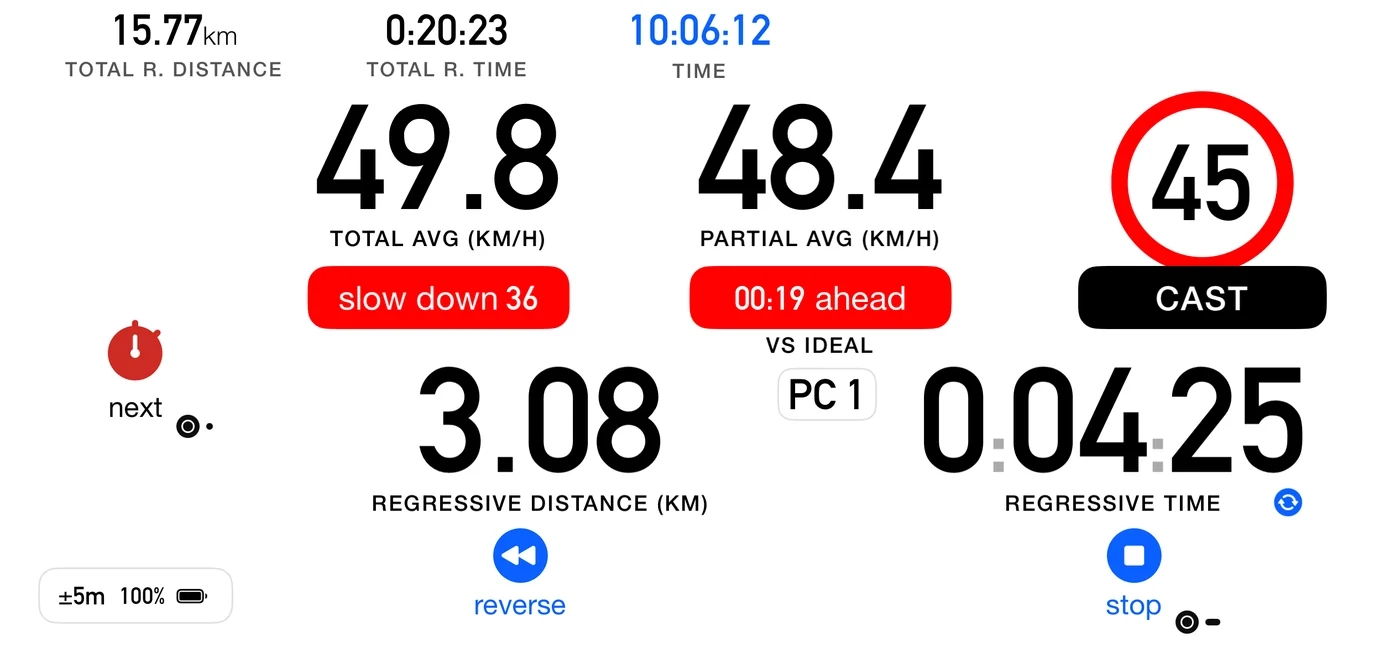
| Element | What it tells you |
|---|---|
| Chip | which part of the route you are on, showing the paper's own label if you typed one |
| Type pill | CAST, Target Avg, Time, Transit, Pause, Special, Open Road |
| Speed sign | the number you pace on this part |
| MAX chip | on a capped part, the ceiling: the chip replaces the current-speed caption, SPEED · MAX 155 or SPEED · LIMIT 100 |
| Pace tip | the speed to drive right now (6.3) |
| Time pill | how many seconds off the ideal you are (6.2a) |
| Average pill | the average's caption on a black pill, reading PROV. · AVG. SPEED, while the run is recorded at the roadbook's distances (6.11) |
| The average | your average since the last real control |
| Two distances | how far to the control, and how far to the next waypoint |
| Look-ahead | a brief preview of the next real boundary |
| Puck | the button you press at the boundary, and what it will do |
Both tips are on by default. Settings ▸ Roadbook ▸ Show speed / ideal time tips shows All (default), only the Speed tip, only the Time pill, or Off.
The big circle is always the number you pace, never a ceiling: the blue disc is an Open Road base speed, the red ring a CAST target average. The ceiling is on the dashboard too, though never as a sign. It is the MAX chip under the current speed. Only the look-ahead card signs a ceiling: a red ring while it is in force, and a thin grey ring struck through where it ends.
Coordinates are off by default. On a roadbook built from distances there is nothing to check them against, so they are off entirely for a roadbook that uses references. Turn them on in Settings ▸ Dashboard ▸ Show coordinates if your event actually gives you coordinates.
6.2 The average holds to the next control
In a regularity you are scored on holding an average, and that average belongs to the whole stretch between two controls, not to each little waypoint inside it.
So the big average on screen is your average since your last control, and it keeps counting straight through the references. It needs two or three seconds of real driving before it means anything, because over the first moments it is mostly GPS noise.
That is why there are two distances. One counts down to the next control, so you always know how much road is left to hold or recover the average on. A smaller one counts down to the next waypoint, for the navigation.
The average is a reading, not an alarm, so it does not change colour. It stays in the dashboard's own ink whether you are above the target or below it. Being told off in red for running fast while running slow passed in silence would say something false about a regularity, where early and late cost you the same. What you are doing about the target is the tip's job and the time pill's job, and both of them work in both directions. The one time the average takes a colour is when the independent window owns the slot, and then it goes green, because it is a different measurement rather than a judgement (see 4.7).
6.2a The time pill, and the state that means "this one is gone"
Beside the tip, the time pill shows the live difference between the time you should have taken for the distance covered so far and the time you have taken. On a part where you are holding an average (CAST, Target avg, Time, and a Transit liaison), its colours are instructions, not verdicts, matching the tip next to it. (An Open Road part reads the pill differently, because the rule there is different; see 6.6.)
| Pill | Means |
|---|---|
| Blue | within 2 seconds either way, which is where you want to live |
| Red | you are ahead, so ease off |
| Green | you are behind, so push |
| An outline, with no fill | the time you are down can no longer be recovered on this part |
The pill says which way it means, in a word. It carries the direction beside the number:
00:26 ahead, 00:37 behind, 00:01 on time. There is no plus or minus, because the word is
the sign. Read it with the colour above rather than against it. The word states the fact (where
you are), the colour states the instruction (what to do about it), so on a regularity part
00:37 behind is green, because behind is the side you can still recover.
That last state matters. Green means push, and there is a point beyond which pushing is a promise the road cannot keep: twenty minutes down on a 40 km/h average is not a "speed up", it is a part you have lost. The app works it out directly: on a part with a MAX, it asks whether driving all the remaining distance at that MAX would still bring you back; on a part without one, whether the time you are down is more than all the ideal time left, so that even arriving at once would be late. When the answer is no, it stops instructing you and simply shows the number.
When you stop, both go. The tip and the time pill are instructions for driving, and a stopped run has nothing left to instruct, so both disappear at the stop and the run summary gives the result. The other readouts stay as they were at the moment you pressed. The pill measures against the distance the dashboard shows, the same figure as the partial distance beside it. (Until 3pRally 5.1 a part without a MAX assumed you would never drive faster than one and a half times its average, so on a 40 km/h part it gave up on a deficit 65 km/h could still win back.)
6.3 The pace tip names a speed
The tip does not say "faster". It says the speed to drive, because that is what a right foot can act on. "Speed up 137" means go to 137.
When it expects you to recover depends on how the part is scored:
- On a CAST, the controls are hidden and can sit anywhere along the stretch, so the error has to be cleared promptly: the tip asks for the speed that clears it inside roughly the next kilometre, then settles back to the CAST on its own. Recovering only by the end would leave you late through the middle, which is exactly where an unannounced control catches you.
- On a Target Avg, Time or Transit, you are scored at the end, either on an average over the whole stretch or on a due time at a control you already know about. So it recovers by the end, which is gentler.
It works both ways: when you are ahead it asks you to slow to a number.
On a Target Avg the tip never contradicts the time pill. The tip compares your current speed with the speed still needed to finish on time, and names that speed. The time pill decides which tips are allowed:
| Time pill | "speed up" | "slow down" |
|---|---|---|
| On time (within 2 s) | when you are slower than the speed needed | when you are faster than the speed needed |
| More than 2 s behind | when you are slower than the speed needed | never |
| More than 2 s ahead | never | when you are faster than the speed needed |
"Slower" and "faster" mean by more than about 3 km/h, as for every tip. While on time, the tip still follows your current speed, so a corner can bring "speed up" and a straight "slow down" even with your average on target. "Too far behind" and "over max" are not held back by this table.
⚠️ The number is arithmetic, not advice about the road. The app knows the distance, the clock and the target. It does not know the corner ahead, the surface, the traffic or the weather. Whether "speed up 137" is safe or even possible is the crew's decision, every time.
A tip has to earn its way on, and it does not flicker. It appears once you are more than about 3 km/h off the speed it wants, and it only clears once you are genuinely back, within about 1 km/h. The band you cross to turn it off sits inside the band that turned it on, so a driver sitting on the target does not watch it strobe. The bands are wider for the instantaneous readings, which jitter, than for an average, which barely moves: the Open Road base speed works on your average and uses about 2 km/h on and 0.5 km/h off.
Two limits on it, both deliberate:
- It will never ask you over the ceiling. On a capped part the requested speed is clipped to the MAX. If the time you lost can only be recovered above the limit, the app asks for the limit and no more, and eats the loss. It must never instruct you over the very line it reddens you for crossing. On a part with no MAX it asks for at most twice the part's speed (3pRally 5.1; one and a half times before), so a big deficit never becomes an absurd instruction, nor above your own Max speed (Settings ▸ Dashboard). Where the roadbook sets a limit, that limit is the ceiling, as it is for the "over max" alert.
- Near the end of a part it stops recomputing. With almost no distance left the arithmetic would demand an absurd speed, and by then the error is what it is, so the tip simply goes away.
When it stops asking
There is a point where no speed helps, and the tip says so instead of naming one.
Every part is worth a fixed time: its distance at its speed. A 5 km CAST at 50 km/h is worth 6:00. Once the part's clock passes that time by more than 2 seconds (the time pill's on-time band) and you have not reached the end, the part can no longer be finished on schedule at any speed: arrive instantly and you are still late. From then until the next part, the tip shows "too far behind" instead of a speed, and Voice says it once.
Until that point the tip always names a speed, however far behind you are, within the limits above. Being three minutes down at 4:00 is still "speed up", because the time is still there to be won back. In practice "too far behind" appears when you have stopped, been held up, or pressed next late.
Like the other tips it shows only while your speed is more than about 3 km/h away from the part's own speed, so it can come and go on screen; the voice says it once per part. Inside a dense chain it is not spoken. Open Road keeps its plain "speed up" and never shows it. It is the one tip with no icon: it is drawn as an outline rather than a filled pill.
⚠️ Note what this does not claim. It is a statement about this part's schedule, not about your run and not about what you could do with the road. A driver willing to press on can still change the rest of the route. The app is only saying it has stopped having a number worth giving you.
This works in both directions. Near the end of a part the tip stops naming a number at all rather than falling back to that part's own rate, because that rate is not advice: told to a driver who is behind and pressing on, "slow down" to it would make the loss worse, which is the opposite of what is needed.
Being pinned at the ceiling is a different thing and stays as it is: "speed up 90" on a 90 cap is real advice, floor it to the limit.
6.4 The MAX cap
A part with a MAX behaves differently, on purpose:
- the readout is forced to current speed, overriding your speed preference, because a ceiling is a limit on the speed you are doing right now and not on your average;
- the ceiling is shown as a MAX chip for the whole part, in place of the current-speed caption, so the number is in front of you before you are anywhere near it. It names the readout and the ceiling: SPEED · MAX 155 when the limit is your class ceiling for the whole event, SPEED · LIMIT 100 when this part posts a lower one of its own. Where a language's wording would not fit the column, the chip drops SPEED · rather than spill over;
- over the cap, the current-speed digits turn red, with a beep or a spoken "over max".
One deliberate absence:
- No "slow down" tip. The pace tip is about the schedule and never about the cap. When you are over, the tip area carries "over max" on red instead, which is also what the voice says. The two are kept apart in words so they can never be confused.
The chip is the only place a ceiling appears, on every type. Whenever a MAX binds it is shown, and the big circle never carries it. There is only ever one ceiling in force: where a part posts its own cap and your class also has one, the lower of the two applies. So it gets one home, and the word says which of the two you are under:
| Chip | Means |
|---|---|
| MAX 155 | your class ceiling, in force for the whole event |
| LIMIT 100 | this part posts a lower limit, so it is the one that binds here |
Both are mandatory. The distinction is scope: a limit is local and unusual, a max is yours and constant.
Your own Max speed. Outside a roadbook, or on a row the roadbook leaves uncapped, the ceiling can come from Settings ▸ Dashboard ▸ Max speed instead: the same chip, the same red digits, the same "over max". The roadbook still speaks for its event: wherever it sets a limit, that limit is used, even when yours is higher or lower. Unlike a roadbook cap, your own setting does not force the readout to current speed, so with the average in that slot the limit is only heard. See 11.5.
6.5 Special Stage parts
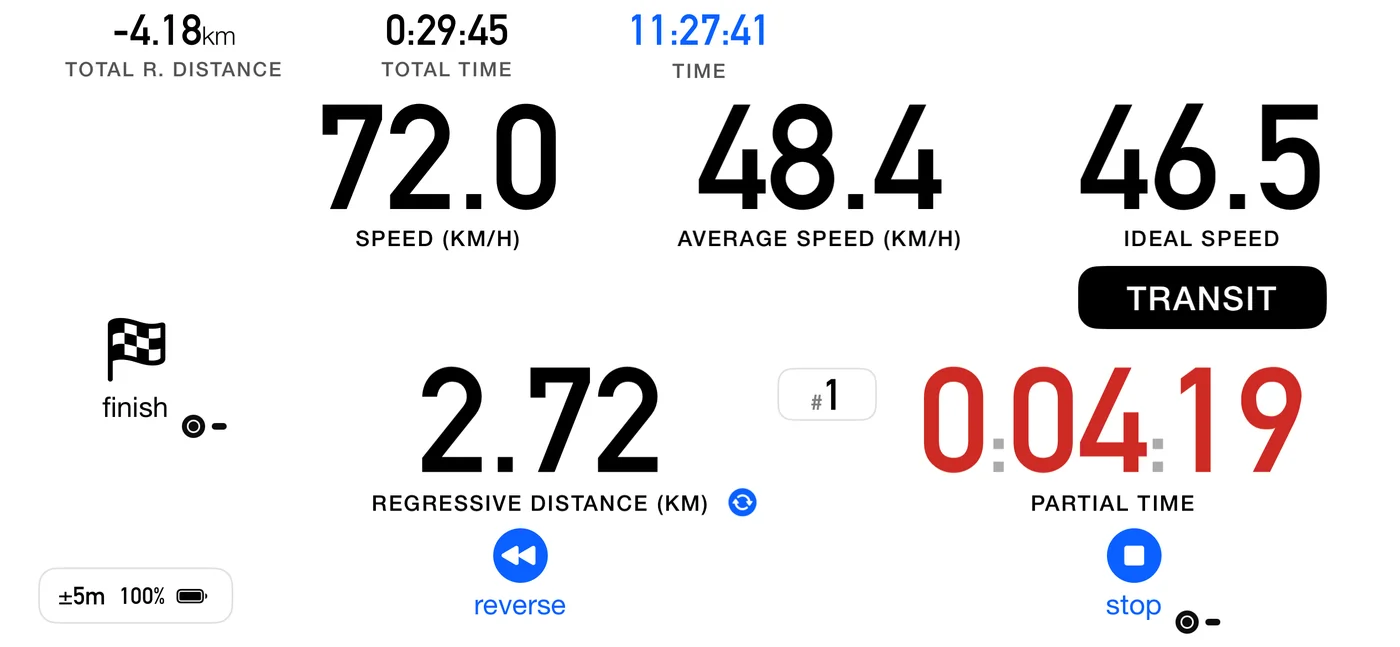
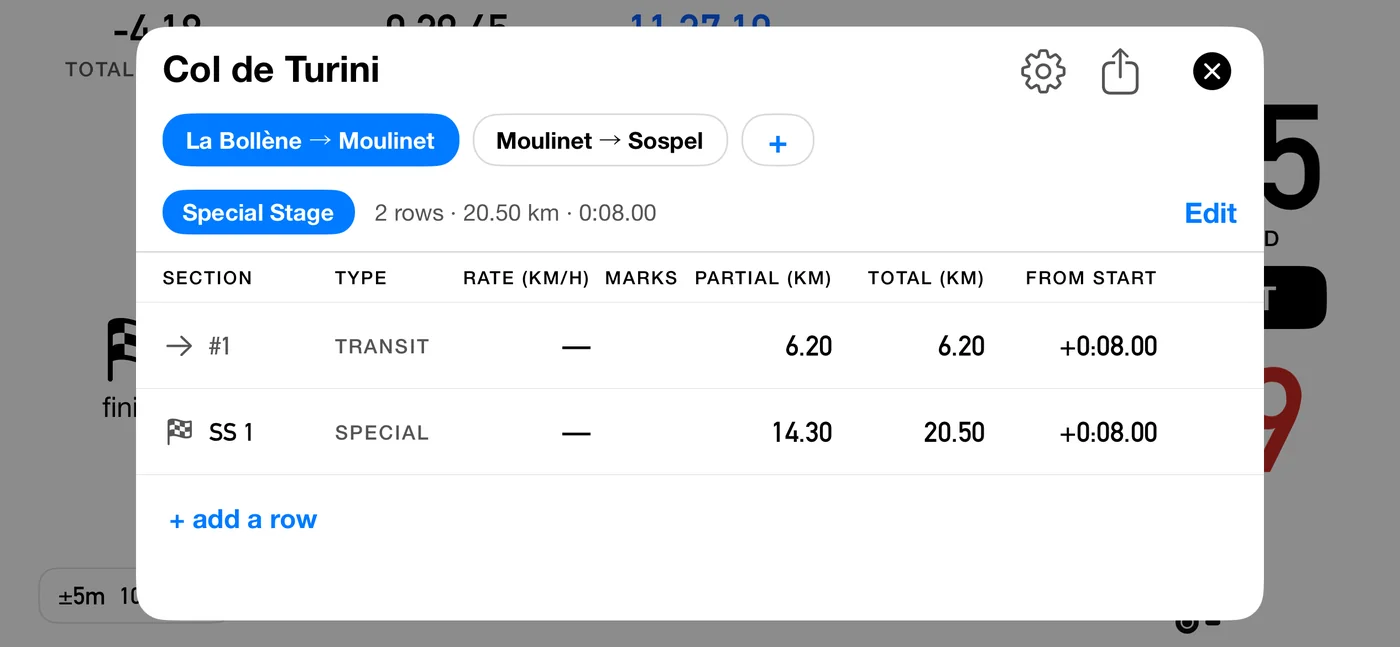
Flat out, fastest elapsed time wins, so there is nothing to hold and nothing to be off. No speed sign, no pace tip, no ideal time. The readout is current speed, time is elapsed only, and the pause button is hidden because there is no clock you may legitimately stop.
Each crossing banks a split.
A Special Stage part lives inside a roadbook, as one piece of a whole event. If what you want is to repeat the same course and keep your best run, that is Stage mode, not this: see 3.1.
6.6 Open Road parts
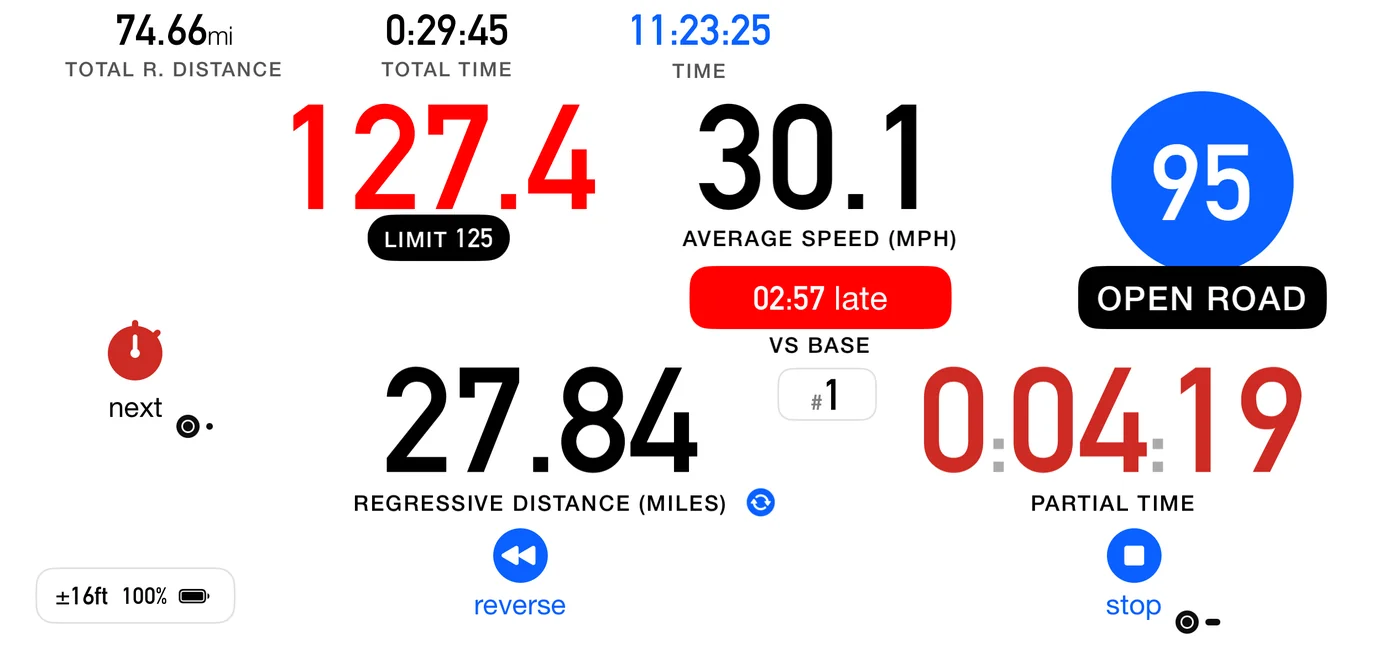
You are managing an average over a long stretch, with posted zones inside it.
- The base speed is the big blue circle: the average you are pacing, and the one the part's base time is computed from. The big circle on an Open Road part always holds the number you pace, never a ceiling. If your average since the last control falls below it, the tip asks you up to it.
- A max cap is shown as the MAX or LIMIT pill under the current speed, as described in 6.4.
- Pause is hidden.
The time pill reads differently here: same shape, opposite sense. An Open Road part is
scored against a base time: you are asked to meet it, and being early is not an error to
correct. The pill carries a direction word like it does everywhere else, but the on-target
word is on base rather than on time, its direction words are early and late
rather than ahead and behind (02:25 early, 00:00 on base, 02:56 late), and its caption
is vs base. The part that matters most: its colours are verdicts, not instructions.
| Pill | Means |
|---|---|
| Green | on the base time, within a couple of seconds. This is where you want to live |
| Blue | early: you are inside the base time and have margin in hand |
| Red | late: you are over the base time |
Green sits on on base, not on early, and that is the rule rather than a preference. An open-road base time is a time you are asked to meet, and there is no advantage in beating it: a part finished a minute under scores exactly what a part finished on the second scores. So green marks the state worth holding, and blue says you have room rather than saying well done. That is useful, because the margin you are spending buys nothing and your class ceiling is still there.
Late is the only side that costs you, which is why it is the only side that reddens. The three colours are the same three your per-leg card and your finish card use for the same run, so what you read at speed, at each control and at the end all agree.
Red stays red however far behind you are. The empty-outline state described in 6.2a belongs to parts where green is a promise that can stop being keepable; "behind the base time" is simply true, and stays true.
6.6a A part that crosses itself, and the tap that follows it
A row set to advance by distance crosses its own boundary at its mileage, and says so. With Voice on: if the part ahead was already announced on the approach ("CAST 40 ahead"), it only clicks; if not, it names the part you have just entered ("CAST 40", "Transit, ideal 40", or "target 120" for a Target Avg part). A pause row always says its length. With Voice off it clicks, and the target flashes either way. (Until 3pRally 5.1 it said the bare target, "40 km/h", which sounded exactly like the current-speed readout.) The puck under your thumb shows a circled A instead of the stopwatch, with the word auto in Advanced and Roadbook, for as long as the boundary ahead is one of these, so you can see at a glance that this one does not need you.
Tapping it anyway is allowed, and always will be. Your odometer can drift, a row can be mis-transcribed, and plenty of route books put a change at a sign rather than at a mileage, so your eyes have to be able to outrank our distance. The tap crosses the control there and then.
New in 5.0: a tap in the moment just after it fired is absorbed. You are told the control was already crossed, and nothing is banked. Before, that tap recorded a part of almost no length and moved you past a control you had never reached, which then shifted every part after it. You do not need to know in advance that you should not press: press, and if it was already done, the app says so.
This only ever applies to a tap that could not be a real crossing, which means one made while you are still at the very start of the new part. On a genuinely short part your tap goes straight through however soon it comes, because by then you have driven the part and the crossing is real. The same is true of a part with no distance on it, where your tap is the only thing that can cross it.
6.6b Pause parts
A pause is a halt at a place: a regroup, a service point, lunch, parc fermé. It has a duration and no length, so driving it is mostly a matter of what the app stops doing.
The odometer stops. Shuffling forward in a queue is not road, and counting it would walk your distance away from the organiser's for the rest of the route. The clock keeps running, because the time you spend there is real and the schedule already budgets for it: the regressive time counts your dwell down to zero, and that is your due-out.
The pause button does not stop a dwell, and neither does anything else you can press. The halt belongs to the organiser: it lasts as long as the road book says it does whether you sit in the car or walk to the coffee van. Pause still freezes your own clocks, which is what it is for when you are held unexpectedly, but it has no say over a scheduled halt. See 4.3.
Three readouts print a dash for as long as the pause lasts. The ideal speed, because a halt has no pace to hold. The average, because with the odometer stopped there is nothing to average. And the distance to the next control when you are running regressive, because a pause ends on time and not on a mileage, so a countdown there could never reach zero. A dash means the quantity does not apply here, the same thing the Rate column of the strip means by it. There is no pace tip either, for the same reason: you are not off a pace, there is no pace.
The regressive time keeps counting, and that is the one to watch: it is counting your dwell down to your due-out. If you are running progressive rather than regressive, the partial distance stays a real reading and simply does not move, which is true rather than meaningless. The average announcement goes quiet for the length of the pause too, so that what you hear agrees with the dash you are looking at. Current speed carries on being announced: it is a measurement of what you are doing, and it stays true while you shuffle forward in a queue.
The total average keeps falling while you sit, and that one is not a fault. Time passes and distance does not, so the figure drops for as long as the halt lasts. An organiser computes it the same way: a march table divides a sector's distance by its imposed time whatever happens inside it, which is why a sector holding two stamp controls can publish an average of 14 km/h on roads where every other sector runs at 32.
A pause set to advance by itself leaves when the dwell reaches zero rather than at a mileage, since it has none. On tap, you leave when you press next, whenever that is.
The app counts you out, as the start line does, because leaving a regroup is a start against a due-out time. With Settings ▸ Start ▸ Countdown on 5 or 10 sec, the last seconds of the dwell get the same numbers (Voice) or short beeps (Sounds), then Go! or the long beep. On a pause of 2 minutes or more you also hear one quiet One minute. (a double short beep with Voice off); on a shorter one that call would land too early to help. Off silences all of it. The countdown only talks; it never moves you on by itself. A pause set to advance by itself leaves at zero, as it would anyway. One set to advance on tap still waits for your next, and Go! is your cue to press it. The pause button has no countdown, since it ends whenever you say so.
6.7 When the app goes quiet
Where the route is chopped into pieces too short to read, the app tells you it is standing down rather than flashing things you cannot use: a GOING QUIET notice, then a small QUIET chip under the number for as long as it lasts. What remains is the time counting up, the distance and the current speed, which is to say the roadbook collapses into something close to Classic. That is exactly what experienced crews already do by hand on those parts.
6.8 The finish
Out of the box, the finish is never automatic (to make it automatic, see Finishing by distance below). Two things happen at the end of the route, and only one of them is automatic. Noticing is: the puck becomes a checkered flag as soon as you enter the final part, so you can see the end coming. Ending the run is not. You tap the flag and confirm Finish, or, with Confirm stop & reset off, you hold it. That crosses the last control, scores the final part and saves the track.
Your time and distance are taken the moment you press, when your finger or the Flic button goes down, so the hold or the dialog costs you nothing.
The confirmation, or the hold, is the point. Ending a run is not something to be one accidental press away from, because there is no way back into it. Every other boundary has one behind it to absorb a mistake: cross early and the next part simply runs long, and the route is back in step by the following control. Cross well early and the app notices, and offers you about nine seconds to undo it. The finish has neither. It is the only boundary with nothing after it, so the drift the whole route has gathered arrives there at once, with nothing left to put it right.
Flagging the last row to advance by distance is still useful and still allowed. It carries you into the final part by itself. It does not end the run.
Finishing by distance (Finish: auto)
Some events end where the organiser's distance says they do, with nobody at the line. For those, set Finish to auto in the roadbook's format sheet (5.10). It is off out of the box and works in every discipline.
With it on, the run ends by itself when the final part reaches its authored distance, measured the same way auto advance measures a part. Your time and distance are taken at that instant, the dashboard holds them, and a banner over the bottom buttons says FINISHED, with automatic · tap to cancel under it and a thin bar emptying over 5 seconds. With Voice on the app says "Finished" as the banner appears, so you know without looking; with Sounds only, it clicks. Then the app finishes exactly as if you had pressed: it crosses the last control, scores the final part and saves the track.
While Finish is on auto, the button that ends the run says so: the checkered flag reads auto instead of finish, and on a one-part roadbook, where stop is the finish, the stop button reads auto. After a cancel they go back to finish and stop.
- Tap the banner to cancel. Nothing is lost: the dashboard carries on, and you finish by hand as usual. It stays off for the rest of that run.
- Your own finish still wins. Finish by hand before the distance, or press during the 5 seconds, and your press decides.
- Calibrate first. The app can only be as precise as its distance. At 100 km/h, 1% of a long stage is several seconds; calibrate to the organiser's distance (7.2) before you rely on it.
- A final part that is a pause, or that has no distance written in, always ends with a press.
Finishing and stopping are different acts. Ending on the final part completes the route: it crosses that last control and scores it. Ending anywhere earlier is an abandon, and the button deliberately keeps saying stop rather than showing you a flag.
6.9 If you miss a control
The app tells you at the time. Once the odometer says you are more than 300 m, or 10% of the section, past a control you never marked, a notice appears and is spoken once: Past this control. Tap next if you crossed it. It says it once per section, and it stays quiet on the last section (past the end there means you have finished) and inside a dense chain.
It tells you rather than advancing for you. Marking the control itself would record a crossing that never happened, putting a control on your map and in your results that was never on the road.
Nothing is lost even if you drive on. The run summary tells you plainly, for example 1 control not marked, those sections were scored as one leg, and the parts either side are scored merged rather than silently mis-attributed. The app can also still recognise the finish by distance when your crossing count says you are further back than you really are: the puck becomes the checkered flag on distance alone, without waiting for a crossing you are never going to make.
6.10 Learning the calibration from your controls
Settings ▸ Roadbook ▸ Learn calibration from controls is off until you have driven with it, and it only works while following a roadbook.
Every control you mark pairs a surveyed distance with a measured one. What matters is why it takes a few kilometres, because a user expecting an instant correction will think it is broken:
- It measures across the whole run of controls, not one part at a time. A mark is late by a reaction time, and that lateness varies: at 40 km/h half a second is 5.5 m, so a single part carries about 11 m of uncertainty. On a 500 m part that is over 2%, which is larger than the error being corrected. Measured across several parts it becomes a fraction of a percent.
- The reason that works is that the marks cancel. The mark that ends one part begins the next, so its error counts once each way and disappears from the total. Only the first and last marks of a run are left, spread over everything between them, so the answer gets better the further you drive.
- Automatic crossings break the run. They fire when the app's own odometer reaches the roadbook distance, so they would compare the odometer with itself. A part that was cut short, or that swallowed a control you never marked, breaks it too.
- Your own calibration is used until it has enough road, and is replaced once it has, because by then the app has measured over kilometres of the actual event.
- Calibrating by hand starts the count again. Setting a calibration yourself, or clearing one, puts aside whatever run had built up; collecting begins at your next marked control. So a figure you have just entered is never replaced moments later, and the app has to drive a fresh few kilometres of marks before it may disagree with you.
The correction shows on the dashboard, and the first time it happens you get a one-shot notice: Distance calibrated from your controls.
6.11 Which distance a part is measured by
New in 5.0. A part is 800 m because the surveyor said so, and if our GPS reads 791 that difference is our error, not a fact about the road. So by default each completed part is now recorded at the distance your roadbook gives, falling back to the measured one when the part was cut short or was never given a distance. Settings ▸ Roadbook ▸ Use roadbook distances turns it off, and the run uses the distance measured as you drive, as it was before 5.0 and as every other mode still is.
You do not have to decide in advance, and you are not expected to. At the first control where the two distances visibly disagree, the result card says which one it used and offers USE MEASURED DISTANCE. Tapping it switches the run to your own distances instead, including the parts already behind you, so you never end up with one run measured two different ways. Your answer is remembered for the next run.
With roadbook distances on, the average caption sits on a black pill. The pill itself is the signal, and it is the one to read: it is there whenever the run will be recorded at the roadbook's distances, and it is absent when the run will be recorded at yours. Inside it the caption reads PROV. · AVG. SPEED. The figure above it is built from the ground you have actually covered, while the part itself will be recorded at the roadbook's distance the moment you cross its control. Both statements are true, so the caption says which one you are looking at.
Starting your own average takes PROV. off the pill, not the pill off the screen. While the
independent average is running (4.7 The independent average) that readout is your own measurement
and is never scored at all, so PROV. would be saying something untrue about it and the word goes.
The pill stays, because roadbook distances are still armed: end the window and the part's average
comes back under them, marker and all.
The offer is made once per run, and it always gets made. If no control ever shows a difference worth mentioning (on a one-part roadbook there is no intermediate control at all), it appears on the run summary at the finish instead, where you are parked and every part is already recorded. So a route with a single timed part still gets the choice.
With the setting off, the run summary makes the opposite offer. When the roadbook's distances would change the run's average on the summary, even only in its last decimal, the summary says it used the measured distances and offers USE ROADBOOK DISTANCE, which recalculates the run on the roadbook's distances and turns the setting on. The summary then offers USE MEASURED DISTANCE, so you can look at both and go back. The summary's USE MEASURED DISTANCE follows the same rule.
The saved run follows the last basis you picked on the summary. Its distance and average in Tracks and on the share card, and the legs in its leg table, are the ones the summary shows when you close it. With iCloud sync on, the run is uploaded once you close the summary, so your other devices get those figures too.
The time ahead or late on a card never depends on this setting. It is your arrival against the roadbook's schedule at the control, and there is no distance in it. Only the average beside it changes. That is why, with the setting off and your distance a little short, a card could read 2.4 s ahead beside an average just under the target: the time was against the schedule, the average against your own distance. The offer above is there to bring the two onto the same basis. If you calibrate (7.2 Calibrating against a measured distance), the measured distance is the calibrated one you saw on the dashboard.
Changing the setting in Settings part-way through a run does the same thing: the parts you have already driven are recalculated to match, rather than leaving the first half of the run on one distance and the second half on the other.
What you gain is the numbers agreeing: that part's average, its ideal time and its error all tell one story, built on the same distance the organiser is judging you against, and the app's own distance error no longer moves your averages.
⚠️ It does not protect you from marking late. The distance is pinned but the clock is not, so a mark a second late lands entirely in the time and pulls that part's average down, slightly more than it would with the setting off, where the extra metres you rolled are counted too. Over a whole run it comes out in the wash, because the mark that ends one part begins the next, so the errors cancel. It is on a single part's card that a late mark shows.
What you give up is the measured truth. If you drive a different route from the one surveyed, by reversing or by taking a wrong turn, that extra distance is real and the setting hides it.
Which one should you pick? On answers "did I hold the schedule", which is what the organiser is judging. Off answers "what did my car actually do", which is the honest number the day you drive a different route from the one surveyed.
The app does not decide this for you, and deliberately so: it cannot tell a wrong turn from a slipping wheel, and a large gap on a rough stage is usually calibration drift rather than a navigation error. You know which one it was.
The saved track always keeps its physical GPS distance either way, because the trace is a different object from the score. Each part keeps both distances, the roadbook's and yours, and a saved run's results show as they were recorded.
⚠️ The final average can differ from the one on screen as you finish. The live average is built from the distance you have actually covered. At the finish the run's average is worked out again from the recorded parts, which with this setting on means the roadbook's distances. If the two disagree, the run summary shows a slightly different average from the last one you saw while driving.
Because the two answers really do differ, the run card says which one it used, but only when the difference is large enough to see on screen.
6.12 The look-ahead
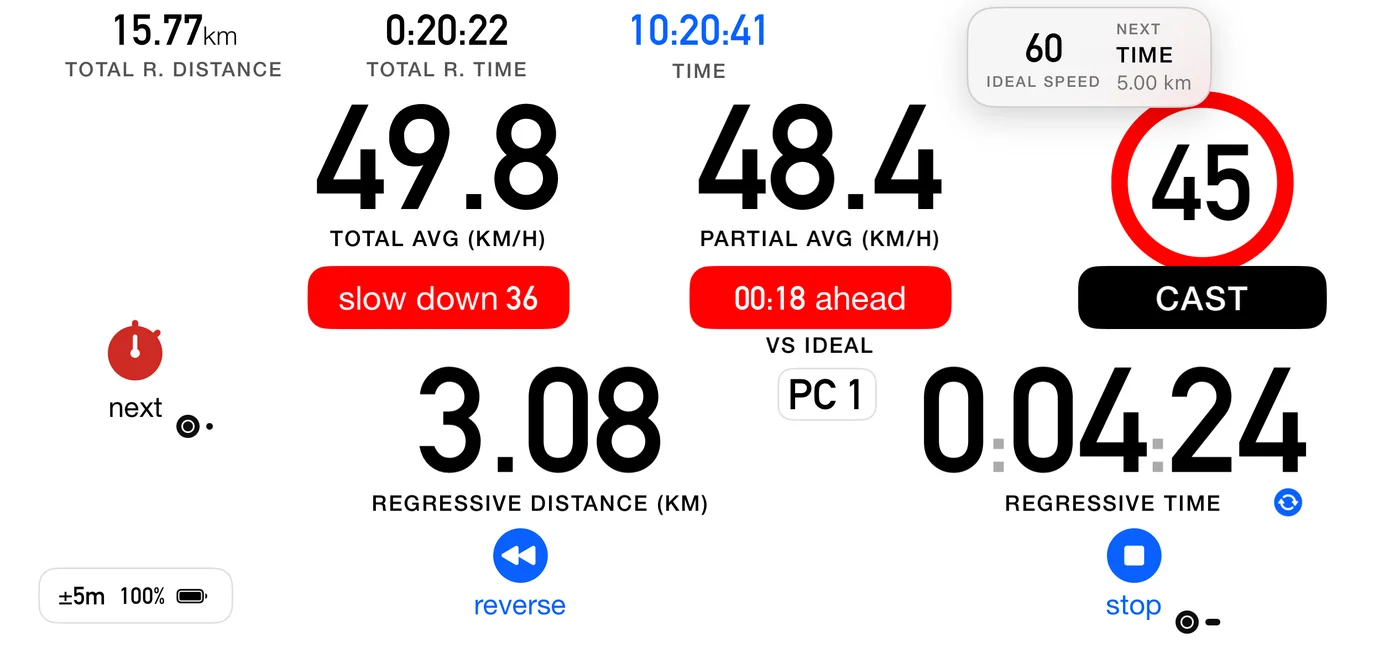
Show upcoming section reveals a brief frosted card as you approach a boundary, previewing the next real one: its type and its sign. It follows the same relevance rule as the voice, so it stays quiet through references. It reveals about twelve seconds out at your current speed, never later than 150 m, holds a few seconds and slides away, once per part.
Inside a pause it counts the twelve seconds on the clock instead, because a pause is a point and has no distance to run down: measured on the odometer it was satisfied the instant you arrived, so the card appeared at the start of the halt and told you what was next before the halt had begun. It now reveals about twelve seconds before your dwell is due to end, which is the same moment the pause is about to release you. A pause with no authored dwell has nothing to time the glance against and gets none.
The card names the length of what is coming, and for a pause that length is a time, because how long you are held is the only thing about a halt worth reading in advance. The spoken callout does not read the length out, for a pause any more than for a driven part: it tells you what you must act on, and a duration is something you glance at.
With Voice on and Announce upcoming section on, it also speaks a one shot callout.
6.13 Recaps
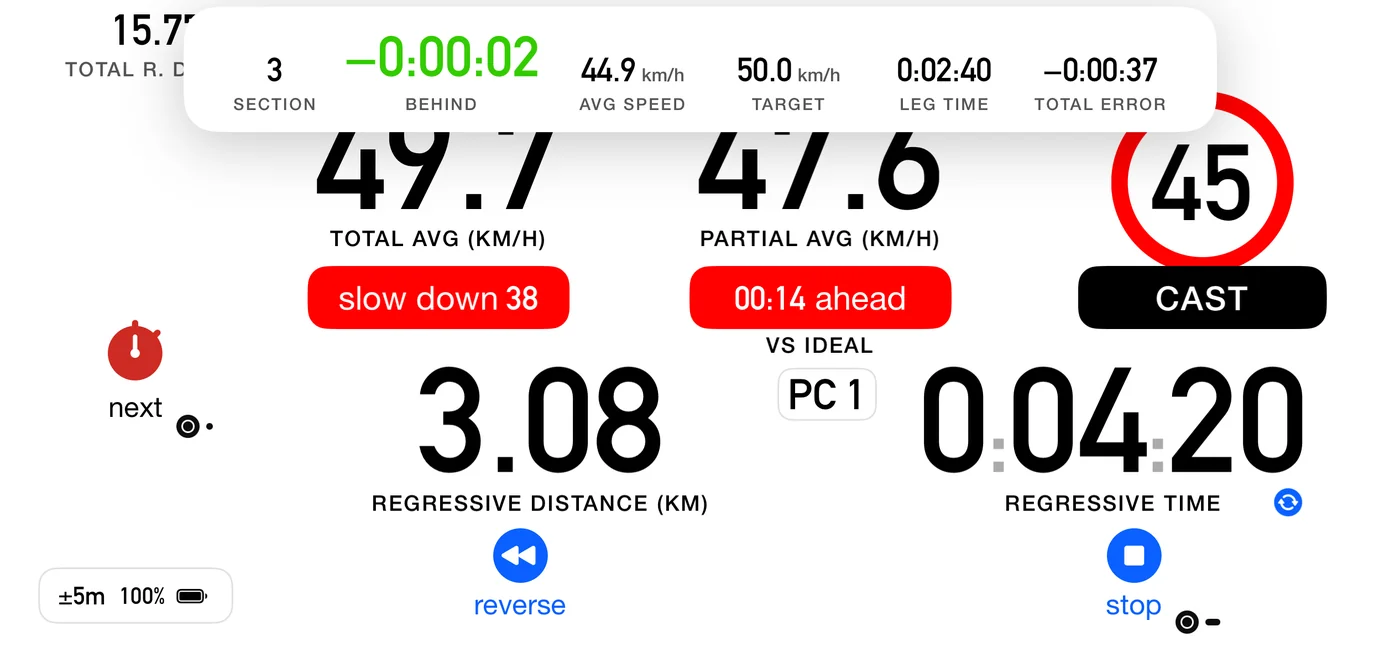
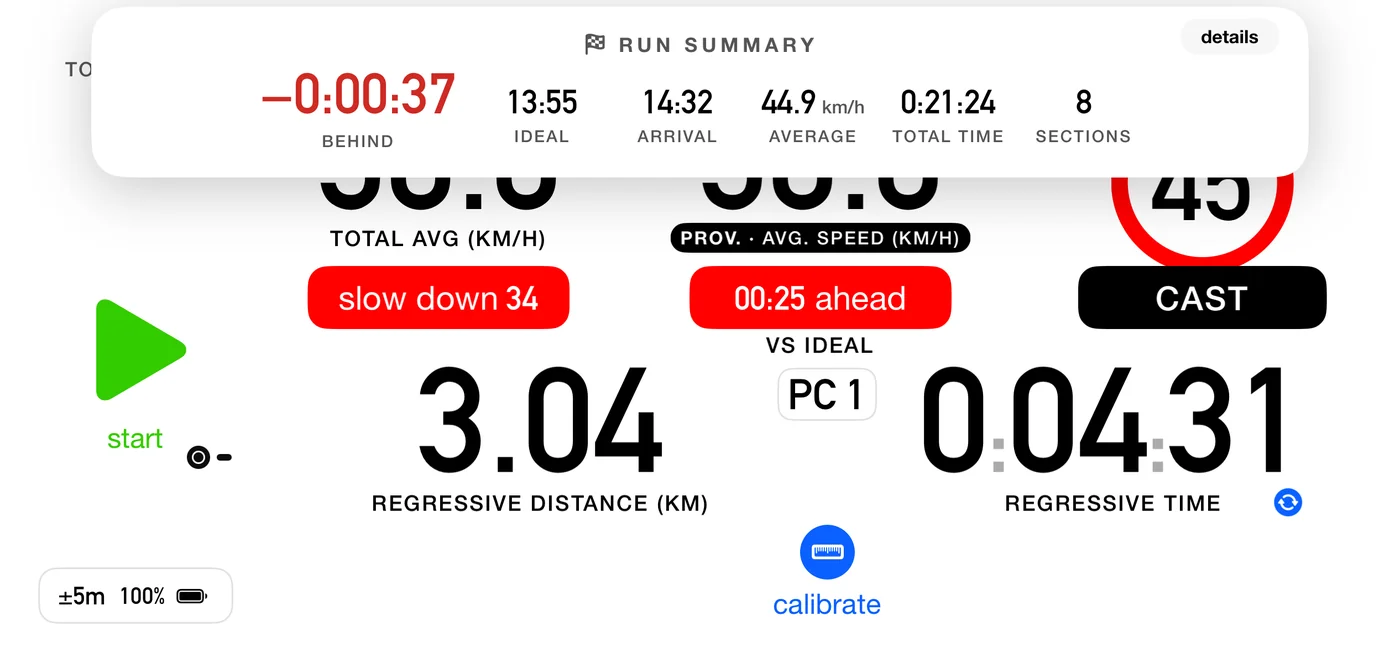
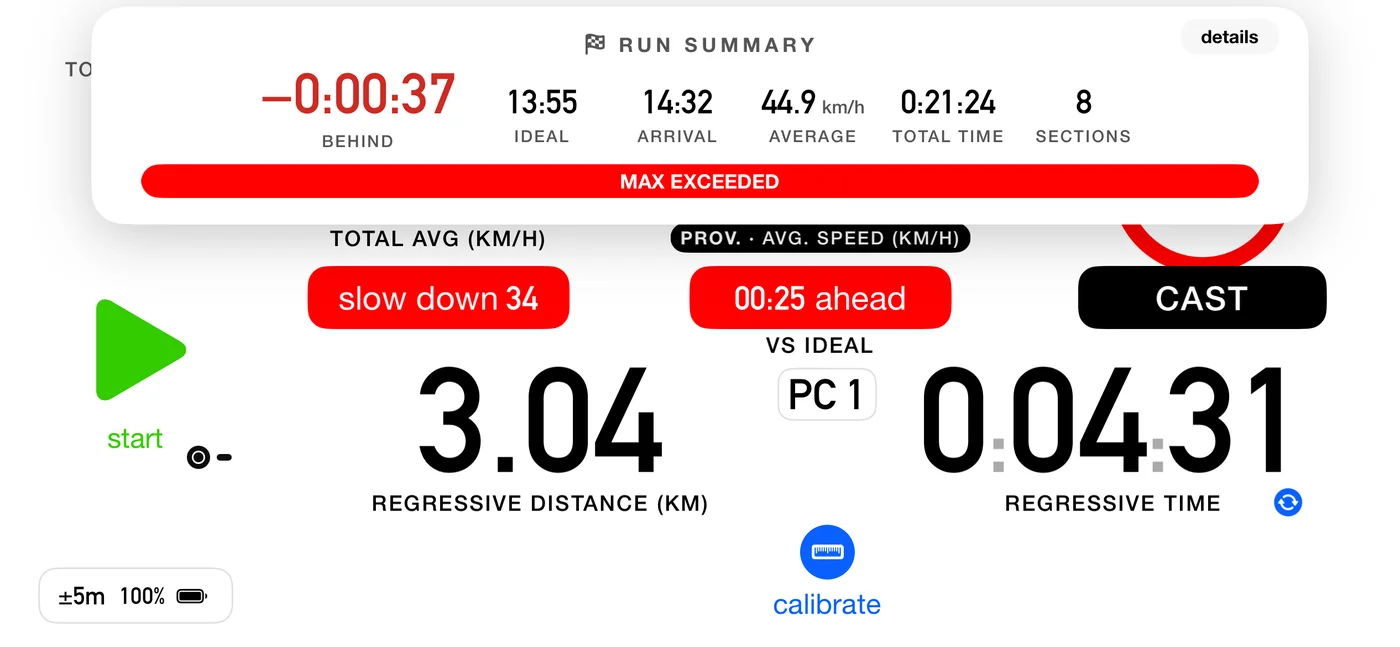
After each crossing a card shows that part's result, governed by Show result at each control. The card at the end of the whole run is a separate setting, Show run summary:
| Type | Hero | Colour |
|---|---|---|
| CAST and Target Avg | signed delta against the ideal | blue on time, green behind, red ahead |
| Open Road | signed delta against the base time | green on base, blue early, red late |
| Special | elapsed time, neutral | there is no target, elapsed is the score |
Note the flip: on a regularity part still being driven, being slow is green because you can still make it up. In Open Road nothing is recoverable in that sense, so green marks the base time itself and being early is merely blue.
The card also shows your ARRIVAL, the time of day at the moment you pressed, on the same clock and in the same format as the run summary. Crossing a control is when you write that time on your time card, and while the card is up it covers the dashboard clock, so it carries the time itself. On a part driven to a schedule, the time you were due sits beside it, captioned as your roadbook's vocabulary names it (due, target or ideal). A Special part, or a part cut short, shows the arrival alone: there is no schedule to be due against.
The count on the summary is CONTROLS crossed, not rows in your roadbook, and the two are not always the same number. A row whose boundary is an instruction rather than a control (a speed change, a reference you zero the trip at) moves you on to the next row without being something an organiser has a time for, so it is not counted. A nine-row roadbook with one such row reports eight. If you want the count to match your paperwork, that is the flag to check on the row: see 5.6.
The card at the end of the run is coloured differently, and deliberately so. While you are driving, those colours are instructions: green means push, because being behind is the recoverable side. Once the run is over nothing is recoverable, so the same colour would be a verdict, and it would be congratulating you on your worst result. In a regularity both directions are penalties and they are scored the same way, so the final summary greens neither:
| Final summary | Colour |
|---|---|
| Within half a second of the schedule | blue, on time |
| Anything else, in either direction | the warning accent, with the word saying ahead or behind |
Open Road greens a run that finished on the base time, and blues one that came in early: beating a base time earns nothing, so the colour does not congratulate it. A liaison likewise mutes early rather than rewarding it.
Splits are yours, and that is the point. In-stage splits are not official anywhere. That is exactly why we give them: where you lost the time, or the turnaround on an out and back, is information no board hands you. Not official does not mean not useful.
6.14 Counting down instead of up
The distance and the time can count down to the end of what you are on, instead of up. A toggle on the dashboard switches them, and from 5.0 so does Settings ▸ Dashboard ▸ Regressive distance and time. They are the same setting, not two: change it in either place and both agree. It is on by default.
New in 5.0: your choice is remembered. Before, the toggle only existed on the running dashboard and it reset to counting down every time the app was restarted, so a crew who preferred counting up had to set it again each morning.
- Distance counts down in every discipline. A known length can always be counted down.
- Time counts down everywhere except Special Stage and Open Road, where it stays elapsed even with the toggle on.
- A countdown that goes past zero means you are past the ideal, and it turns red.
On Special Stage and Open Road the toggle moves next to the distance, since that is the only thing it still governs there.
6.15 A one-part roadbook
New in 5.0. Some roadbooks are a single part: a total distance and a target average, which is how a lot of open-road classes are written. On those, counting down would tell you the same thing twice, because "how far to the finish" and "how far to the next part" are the same number.
So on those roadbooks the big partial is not a countdown. It is a trip, exactly like the one in Classic and Advanced: it counts up, and you can zero it whenever you like, at a sign, a junction or a village, to call distances off the roadbook. The total keeps counting down to the finish as usual, so nothing is lost.
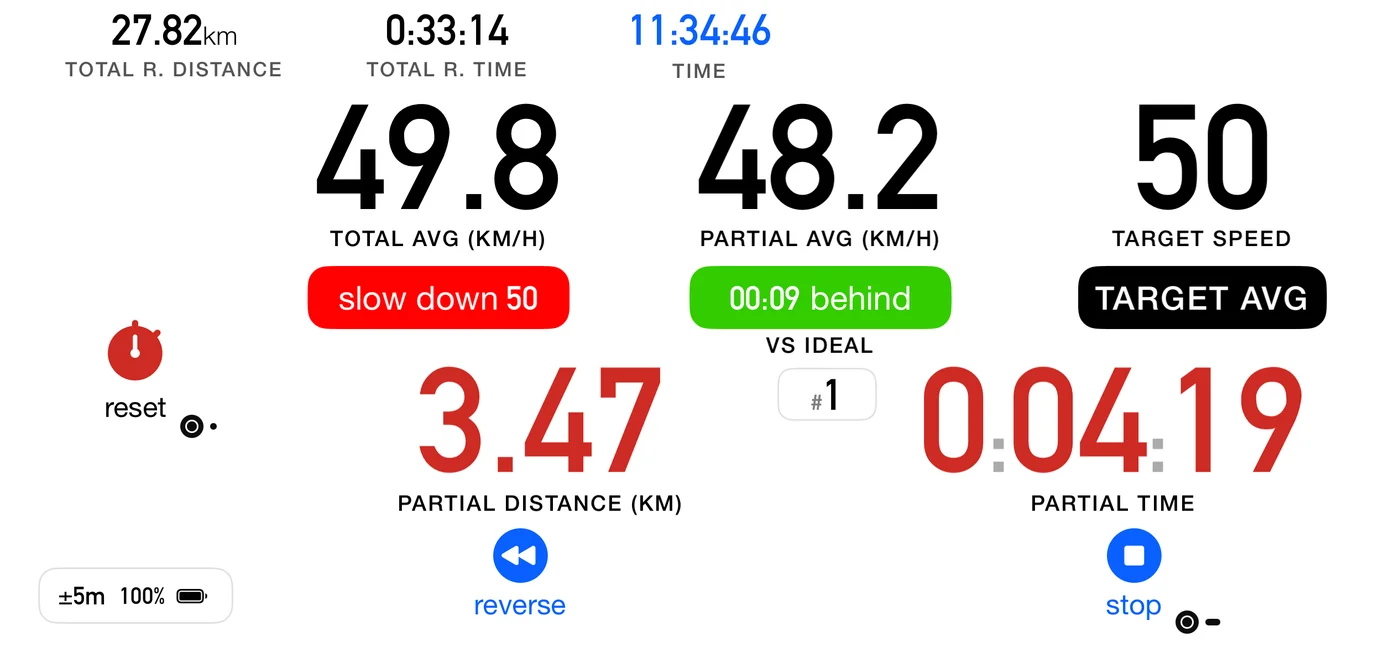
To zero it: tap next, or a single click on a Flic. On these roadbooks there is no control to cross, so that press has nothing else to do. The control is labelled reset rather than carrying the chequered flag, because a tap here does not finish anything.
To finish: press stop, exactly as you would in Advanced. It asks Finish? rather than Stop?, and it scores the part properly. That has always been true and has not changed.
If you have driven a one-part roadbook before, next did nothing at all: there was no control to cross and nothing to advance to, so the button sat there unused for the whole run. It now zeroes your trip. That is a button gaining a job, not changing one, so there is nothing to unlearn.
The badge counts your zeros. The small # badge shows #1 when you start and steps to #2,
#3 and so on each time you zero. On these roadbooks the part number would say #1 all day and
tell you nothing, so it counts your instructions instead: it answers which line of the paper am I
on, the same way Classic and Advanced have always counted.
Zeroing the trip changes nothing you are scored on. Your result and the distance recorded for the part carry on measuring the whole part. The trip is a counter for you, not for the organiser.
What the partial average does when you zero depends on the part's type, because the two kinds of part are asking different questions:
- On a CAST, Target avg or Time part, the partial average starts again from the zero. You are holding an average, and if you authored a single part in order to zero at landmarks off the paper, what have I averaged since that landmark is the question you are asking. It behaves exactly as the same readout does in Classic and Advanced.
- On an Open Road part, it keeps measuring the whole part, and its caption says total average speed rather than partial. There you are beating a base time over the part as a whole, so an average since a landmark scores nothing, and the readout says what it really is.
Counting down is a Settings choice here. The dashboard's countdown button is not shown on these roadbooks, because the only thing left for it to govern is the total, and it sits beside the partial. Use Settings ▸ Dashboard ▸ Regressive distance and time, which is the same setting, not a second one. The total still counts down to the finish when it is on, and can pass zero if you go beyond the distance in the roadbook.
If your roadbook has more than one part, none of this applies, whatever those parts are: next and the click go to the next part, and the partial counts down to it as described above.
The independent average is a separate thing and is unchanged: switch it on in Settings and it gives you a distance and time window that survives a control. On a Flic, a double click resets it, on any roadbook.
6.16 A row that zeroes the odometer
If the row you just opened carries the zero-odometer flag (5.6), the trip reading goes back to zero at that control. It zeroes the reading, not the measurement: your schedule, the distance to the finish, the marked controls and the recap totals all carry on untouched.
How you are told depends on whether you could see it happen:
- You tapped, and the odometer is on screen: the counter pulses. You crossed the control yourself and the number answers you directly, so there is no card.
- The row fired by itself, or the regressive readout is on: a brief "Total distance zeroed" card. With the regressive readout the total slot shows distance still to go, which this flag deliberately does not move, so without the card the instruction would fire with no visible trace at all.
Which of the two you get therefore follows Settings ▸ Dashboard ▸ Regressive distance and time (11.5). With it on, which is the default, the odometer is not the number in the total slot, so you get the card. Turn it off and the odometer is on screen, so a control you tapped yourself pulses instead. New in 5.0: that setting now keeps its value between sessions, so if you have switched it off you will see the pulse from then on, where before it went back to the card every time the app was restarted.
⚠️ It is the total that zeroes, not the partial. Both counters do read zero at that control, which is what makes it easy to misread, but for unrelated reasons: the partial is zeroed by every crossing, flagged or not, and the total only by this flag.