9. Flic and media buttons
A Flic is a small Bluetooth button. Stuck to the wheel, the dash or the roll cage, it lets you start, mark and restart without reaching for the phone, which is the difference between a clean crossing and a fumbled one.
9.1 What each press does
| Press | Action |
|---|---|
| Click & Hold | Start or stop the counters |
| Click | Mark the crossing, the same as next. On a one-part roadbook, zero the trip (6.15) |
| Double-Click | Whatever the reset button does: quick restart where it is available, or start and end the independent average when you have that switched on (Stage has no independent average) |
A Flic stop saves the run (unless it is shorter than 20 m, a mis-start that is never saved). It cannot do anything else: with auto-save off the on-screen Stop? dialog asks you, offering Stop & Save Track as a second button (4), and a Flic press has no dialog to ask in. Keeping the run is the only safe reading of a question nobody can answer, so that is what it does.
While a Flic is connected, the dashboard shows small Flic badges beside the buttons your Flic can operate, so you can see which on-screen button your thumb is mapped to: one dot for a click, a dash for a hold, two dots for a double-click. With no Flic connected there are no badges, unless the Bluetooth media button is on: then they show its keys (9.6).
A hold does not cost you time. The press is timed the moment the button goes down, so the second or so you hold it is not added to your time or distance.
Starting is the one exception, and it happens when you release. On a parked dashboard a click does nothing, because only a hold starts a run, and a Flic cannot tell a hold from a click until you let the button go. So nothing happens while you are still holding, and the run begins the moment you release. The app says hold, then release to start at the bottom of the screen as soon as you press, so you are not left wondering, and the notice goes the moment the run starts. If it was a click after all, a reminder of the Flic gestures takes its place, in the same spot. Everything that ends a measurement is the other way round and is taken at the moment the button goes down, as above. If your start has to be exact, use Auto-Start (4.1), where the start is a clock rather than a press.
⚠️ At the finish of a roadbook, the click is refused and the finish fires on a HOLD. The badge changes to say so. Ending a run must never be one accidental press away. See 6.8. The exception is a roadbook with no control before the finish: there the click has no crossing to mark, so it zeros your trip instead and you finish with stop.
9.2 Which generation you have, and why it matters
This is the single most likely thing to go wrong, so be deliberate about it. When you tap Connect, the app asks which hardware you have:
- Flic 2 or Duo is what flic.io sells today, and what the app's own buy link points at. If you have just bought a button, this is almost certainly yours. Pairing happens inside 3pRally: a panel appears and you press and hold the button until it is found. You do not need to remove it from the Flic app first, since a Flic 2 can be paired with both at once.
- Flic 1 (legacy) is the original 2014 button, discontinued in 2019. Choosing it hands the button off to the Flic app, which is the only correct way to pair that generation, and the only reason the option still exists.
⚠️ Picking Flic 1 while holding a Flic 2 produces "button not compatible", and that message comes from the Flic app, not from us. The button then cannot be selected at all. It looks like a fault in 3pRally and is not. If you land there, come back and choose Flic 2 / Duo.
9.3 Setting one up
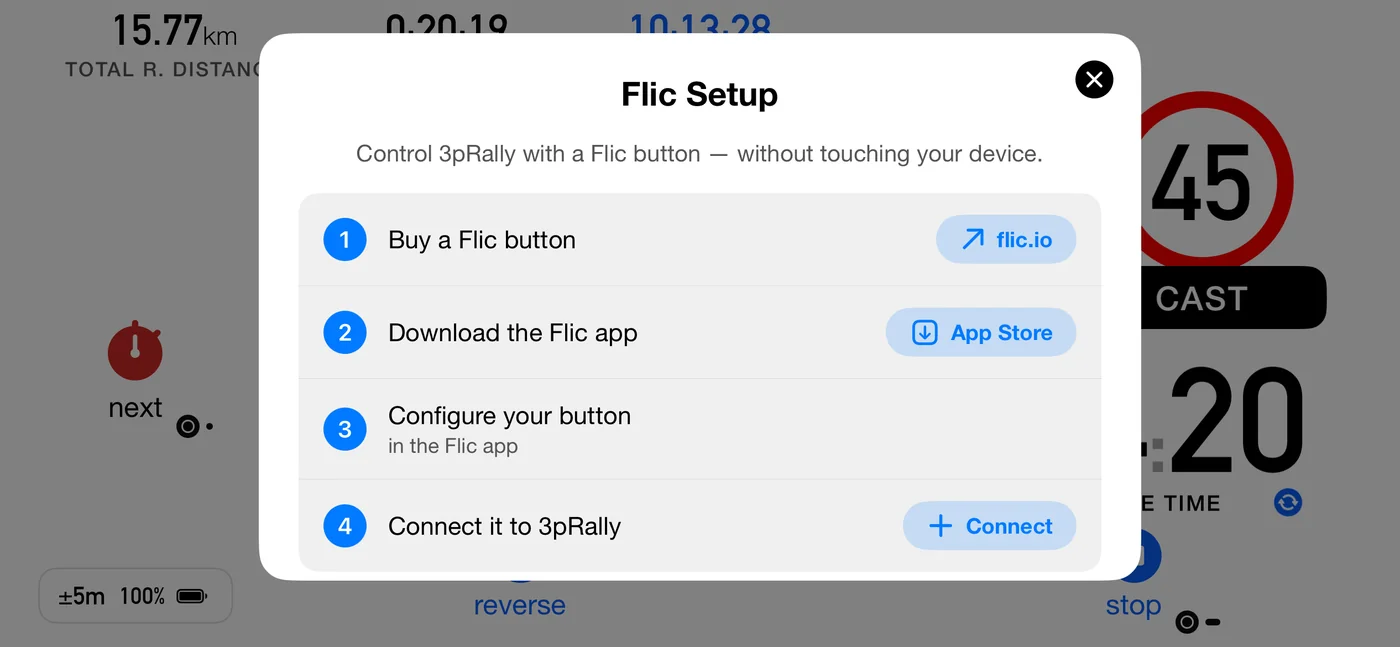
Settings ▸ GPS & devices ▸ Flic button. The row shows the status: no button connected, the button's name, or that several are connected.
If Bluetooth is off or not permitted, a banner appears above everything else, because nothing below it can succeed until that is fixed.
The sheet walks four steps:
- Buy a Flic button, linking to flic.io.
- Download the Flic app. This step ticks itself once the app is installed.
- Configure your button in the Flic app. Your button must be known to that app before 3pRally can use it.
- Connect it to 3pRally, which asks the generation question above.
Then, for a Flic 2:
- Click and hold the button. Tap to cancel.
- A Flic was discovered. You can now release the button.
- Connected to [name]
Once connected the screen switches to the connected state: a status banner, the gesture legend, and a Disconnect action.
9.4 When pairing fails
The app names the fix rather than showing a bare error where it can. The most common cause by far is simply that the button was never put into pairing mode: the instruction says click and hold, and it is easy to read that as a tap. Hold it for about seven seconds, until it appears on screen.
Backing out is not a failure. Tapping the panel to stop the scan, or cancelling the iOS Bluetooth dialog, is treated as a cancel rather than an error.
Other things worth checking:
- Firmware. Keep it up to date in the Flic app.
- Several buttons. If more than one is connected the app says so, and they all drive the same three presses. Disconnect removes one button at a time; tap it again for each.
- Bluetooth must be on and permitted for 3pRally.
9.5 Where to put it
- Wheel spoke, for a driver running alone: hold to start at the control, click at each crossing.
- Navigator's armrest, the usual rally arrangement: the navigator marks each control while reading the roadbook.
⚠️ Pair and test it before the event. The first connection needs the Flic app, an App Store download and a Bluetooth handshake, none of which you want at a start line.
9.6 Bluetooth media button
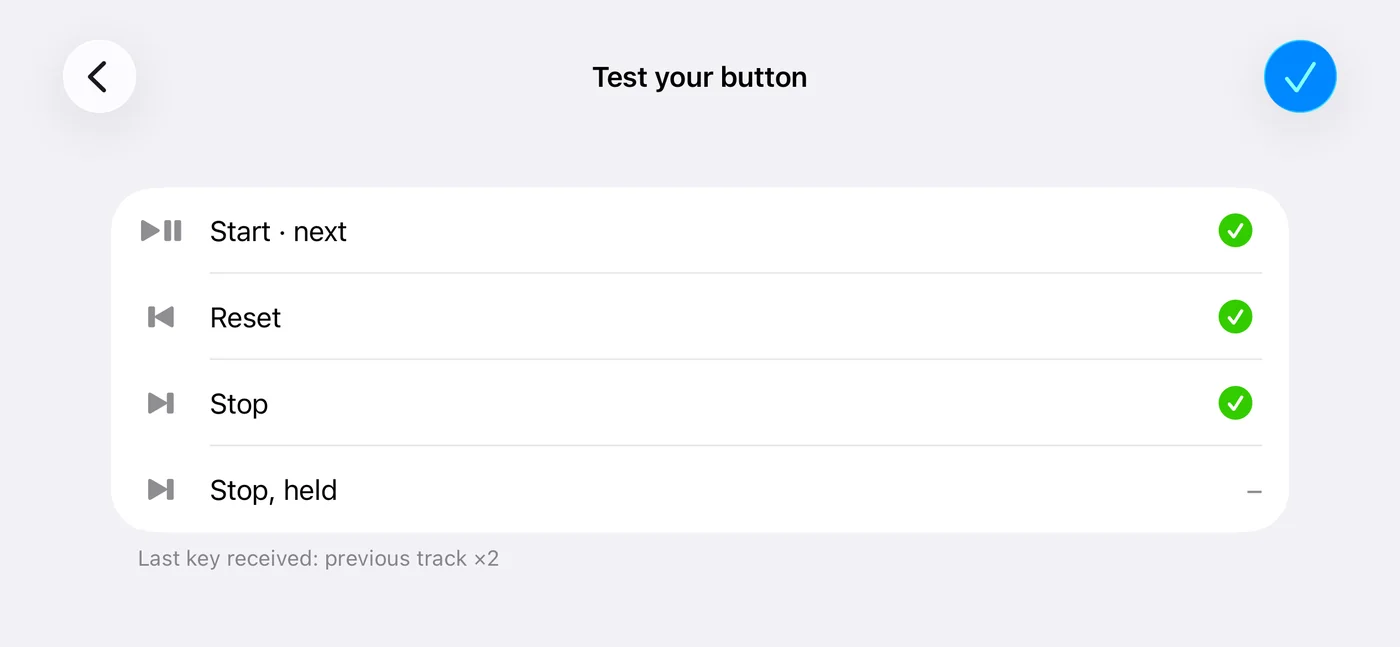
New in 3pRally 5.1. No Flic? A clip-on Bluetooth media button for the steering wheel (several brands make one, with Play/Pause, Next and Previous keys, sending the same media keys as a headset; what a held key sends varies, see below) can drive the run. Turn it on in Settings ▸ GPS & devices ▸ Bluetooth media button (off by default). Turning it on opens Test your button: press each key and watch a green ✓ appear at the end of its row. Under the rows, Last key received names what the phone actually got, with a count when a key repeats, so you can see what a hold sends. Nothing happens to your run while that screen is open.
One wheel button at a time. While the media button is on, a Flic is ignored: it stays paired, and its row in Settings says Off (media button on). Turn the media button off to use the Flic again.
The badges show the media keys. While the media button is on, the small Flic marks on the dashboard buttons become the key that drives each one: ▶❚❚ on next and go, ⏮ on reset (where reset does something), ⏭ on stop and on the finish. They are faint until a key has reached the phone since the app opened: iPhone does not tell an app whether a Bluetooth button is connected, only when a key arrives, so faint badges mean "press a key to check the button is there".
| Key | Parked | Running | In a pause row |
|---|---|---|---|
| Play/Pause | Start | Mark the crossing, the same as next | Carry on |
| Next | Stop: press twice within 3 seconds, or hold it once if your button can | Stop, the same way | |
| Previous | Whatever the reset button does (a quick restart takes two presses) |
Play/Pause is usually the biggest key, so it gets the job you do most: start, then every crossing.
Stopping takes two presses because a press is not a hold, and the hold is what stops a Flic finish from being one accidental press. The first press says Press again to stop (on screen, and spoken with Voice on), and the run is timed at that first press, not at the second. Some buttons also send a signal when Next is held: if yours does (the test shows Stop, held ticked), one hold stops at once. A button stop is a Flic stop: it saves the run without asking (a run under 20 m is never saved), and at a roadbook's finish it is the finish. Any other command (another key, a button on screen, a Flic) answers Press again to stop with a no, and the message goes away.
A quick restart also takes two presses of Previous, for the same reason: it throws the run away. The first says Press again to restart. Where Previous starts the independent average instead, one press does it, because the moment you press is the measurement. Where reset has nothing to do (parked, paused, or a roadbook without the independent average), Previous says Reset is not available here.
Headsets are not supported. They send the same media keys, but they have no separate Next and Previous keys, so the test will not pass.
⚠️ Music and podcasts pause while the app is open and during a run. iPhone sends these keys only to the app that is playing audio, so 3pRally holds the audio, silently, the same way Voice turns other audio down as soon as the app opens. If something was playing, the app says so (Music paused for the media button). Leave the app while parked and your music is free again.
Some presses are ignored on purpose: any in the first 3 seconds after the button or a car connects (many send "play" as they connect), any in the first second and a half after 3pRally takes the audio over (a car can answer that with a "play" too), and a second press within half a second of the first (some send two signals for one press). A start is stricter: Play/Pause starts a run only with 3pRally on screen, and not in the first 10 seconds after a device connects, so the play button in Control Centre, on the lock screen or on a watch, or a car's late "play", never starts one. A start refused that way says so on screen (Button just connected: press again in a few seconds).